Answer Avery's questions and the tasks she suggests
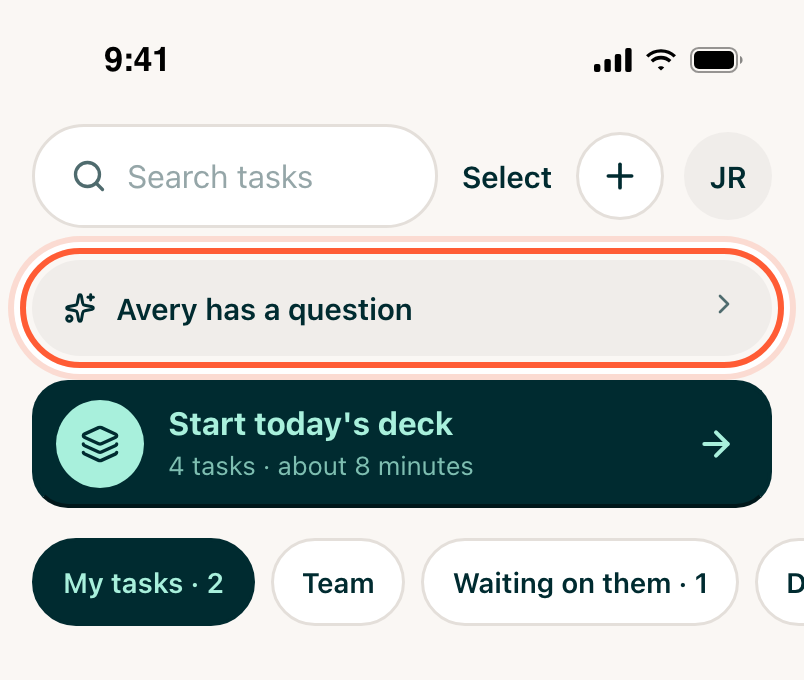
When Avery needs to know something, she asks in your Ask Avery thread and Tasks shows "Avery has a question". Tasks she reads in your notes wait as suggestions until you tap Accept or Dismiss.
When Avery needs something from you, like whether Maya replied to the text you sent from your phone, she asks in your Ask Avery thread, and Tasks shows Avery has a question. Tap it, then tap an answer or type one. When she reads a to-do in your notes, like "call Daniel Friday", she suggests it as a task marked AVERY SUGGESTS. It isn't on your list until you tap Accept. Tap Dismiss if she got it wrong.
Step 1Answer a question
On Tasks, tap Avery has a question (or Avery has 2 questions), above Start today's deck. Your thread with Avery opens, with her question in it.
Tap one of the buttons under it, or type your answer in the box, in your own words.
Questions she asks:
| She asks | Tap, or type |
|---|---|
| "Did Maya reply? You texted Maya 3 days ago from your phone, so I can't see." | They replied or No reply yet, or say what she said. Avery writes the next text from it. |
| "What do you know about Daniel? Anything helps: how you met, what they're after, their family." | Type anything you know, or Don't know them and she stops asking about him. |
| "Did 42 Juniper Lane sell? Tell me the price and I'll draft a text to the 3 visitors who asked." | Type the price, or Not sold yet. |
| "Grace replied. Keep prioritizing Grace for the next 5 days?" | Keep prioritizing or Back to regular. |
| "Did Luis ask to stop getting your emails?" | Yes, remove Luis or No, keep Luis. |
When you ask Avery to make a big change, like deleting or merging someone, she asks first, with a button like Delete and Cancel. Nothing changes until you tap.
A question that no longer matters, because you texted Maya anyway or a week went by, shows No longer needed. You don't have to clear it.
Step 2Answer a question about a note
Sometimes a note names someone Avery can't place, like "call Sam" when you have two. She asks right under the note, and on Tasks, with a button for each person. Tap the right one.
Step 3Accept or dismiss a suggested task
When you write a note or finish a call debrief, Avery reads it for things to do. Under the note you see ✦ Saved: and the task, like "Call Daniel · Fri". The task waits in your deck marked AVERY SUGGESTS and Not on your list yet.
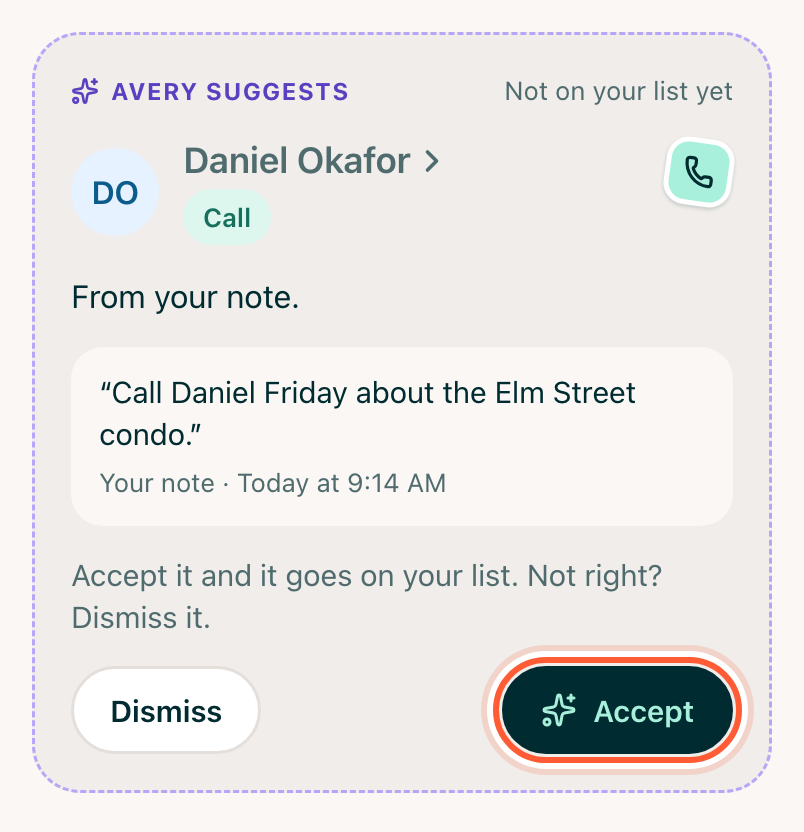
- Tap Accept and it goes on your list. A text or email gets Avery's draft, ready to send.
- Tap Dismiss if it's wrong. A message with Undo shows for a few seconds.
In your task list, a suggestion has a dashed circle, and the day shows how many there are, like ✦ 2 suggested. Open one and tap Add to my tasks to accept it. Changing it in any way, like giving it a date or a teammate, accepts it too. One you leave alone goes away after its day, or after a week if it has no day.
Avery suggests a change to a task
On a task you already have, Avery may ask:
- "Maya replied. Done?" with her reply. Tap Done, or Keep to leave it on your list.
- "Move to Fri at 3 PM?", from a note or their message. Tap Change, or Keep to leave it as it was.
When you'd use it
- You texted Grace from your cell on Monday. Wednesday, Avery asks if she replied. You tap No reply yet, and she writes a different follow-up.
- After a listing appointment you add a note on Priya's page: "Send her the comps Thursday." The task shows up as a suggestion. Tap Accept.
- A Zillow lead came in last week and you know nothing about him. Avery asks. You type "Relocating from Denver, two kids, wants Summit High," and she saves it to his page.
Does Avery add tasks without asking me?
Not from your notes. What she reads in a note waits as a suggestion until you accept it, and she doesn't write a draft or remind you about it until then. See What Avery does on her own.