Preview an email and share it for review
See an AveryIQ email blast exactly as people get it, on a computer, a phone and in dark mode, and share a 7-day preview page with your broker for a compliance review before you send.
Preview shows an email blast exactly as people get it, with a sample person's name filled in. Open it from the email's design: tap Preview at the bottom (on a computer, at the top). Share a preview makes a web page of the email for 7 days, for your broker or a partner to look at before it goes.
When you'd use it
- Your broker checks every marketing email for compliance. Send them a preview link and wait for the OK before you tap Send.
- Your lender partner is co-hosting the homebuyer seminar. Share the invitation so they can check their name and logo.
- You want to see how "Hi {First name}," reads for someone in your database with no first name.
Step 1Open Preview
Tap More, then Email blasts, open the draft and tap Design. Tap Preview.
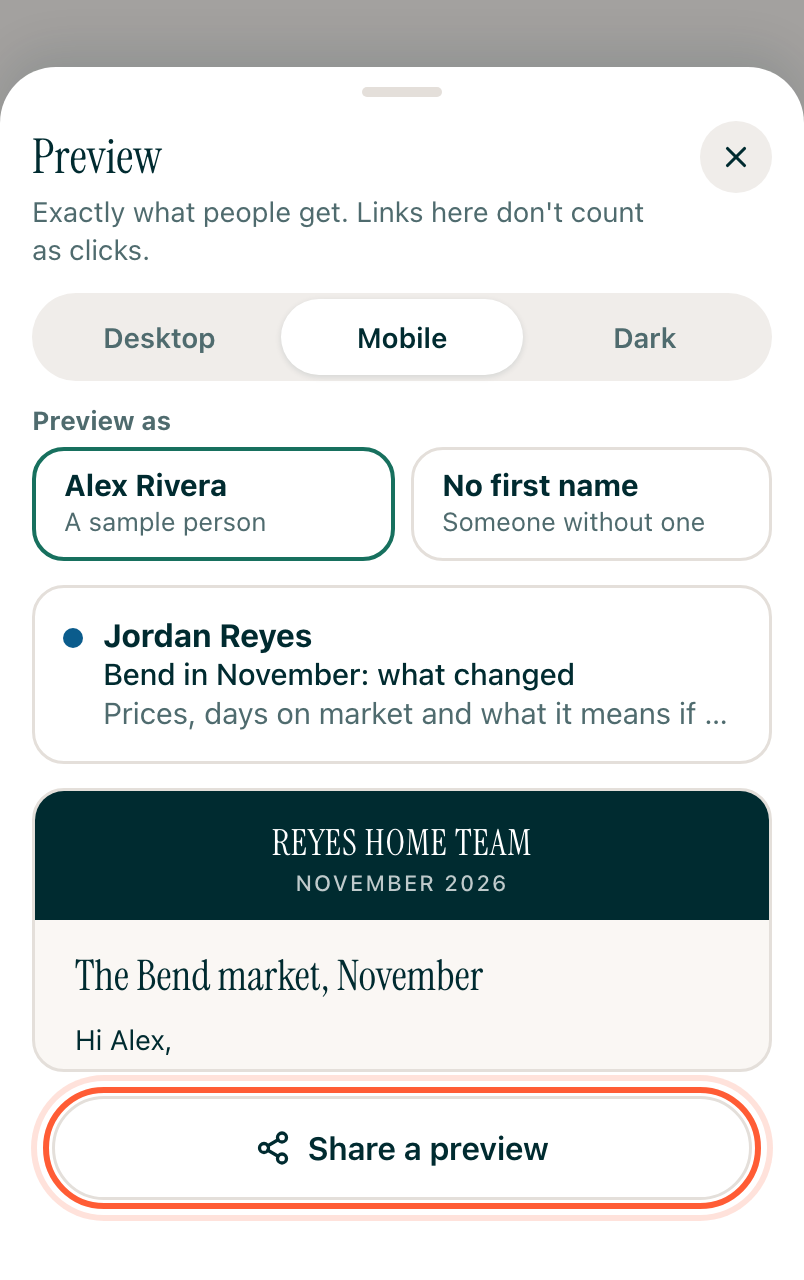
- Desktop, Mobile and Dark show it on a computer screen, on a phone and in dark mode.
- Preview as shows it for Alex Rivera (a sample person) or No first name, so you can check the "Hi there," line.
- At the top you see the email as an inbox row: who it's from, the subject and the preview text.
Links in Preview work, and they don't count as clicks.
Step 2Share it
Tap Share a preview, then send the link by text, email or however you like. The page shows the email as it is now and stops working after 7 days. Changed something after you shared it? Share again for a new link.
Share a preview waits until your latest changes are saved. If it says Your latest changes aren't saved yet, check your connection, or tap Try again.
Can I send myself a test email?
Not from the app yet. Use Preview to check it, and Share a preview to open it on another device or send it to someone. The checklist also has Preview at the bottom, next to Review.
Does a preview go out to anyone?
No. A shared preview is a web page, not an email, and only people with the link can open it.