Schedule an email to send later
Schedule an AveryIQ email blast for tomorrow morning or any time in the next 30 days with Send later, and unschedule it to make changes before it goes.
To send an email blast later, tap Review on its checklist, then Send later on Ready to send. Pick Tomorrow 7 AM, the weekday chip or Pick a time up to 30 days out, then tap Schedule for 1,204 people (your number). Until it goes, Unschedule takes it back to a draft.
When you'd use it
- It's 10 PM and your market update is done. Schedule it for 7 AM, when people check email over coffee.
- You're off to a listing appointment Thursday morning. Schedule your open-house invitation Wednesday night for Thursday at 9.
- Your newsletter is ready a week early. Schedule it for the 1st and forget about it.
Step 1Pick a time
Tap Review. On Ready to send, tap Send later. Choose:
- Tomorrow 7 AM
- the weekday chip, like Tue 7 AM
- Pick a time, from a few minutes from now up to 30 days out
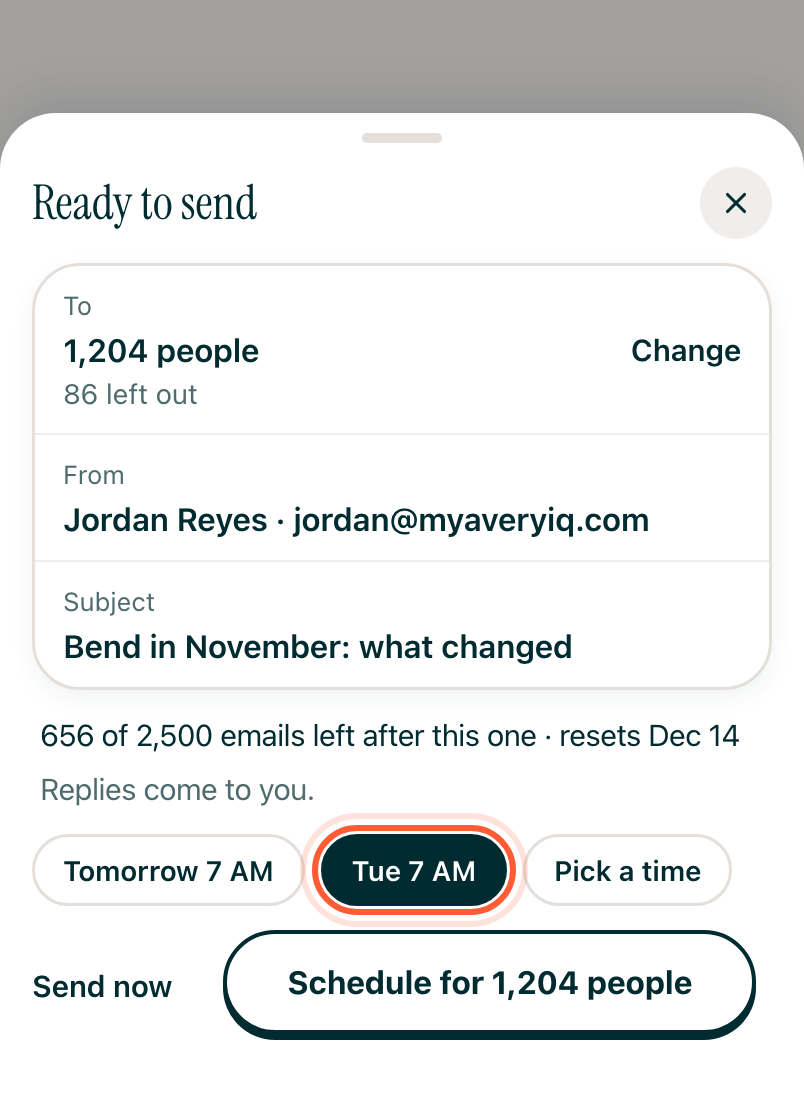
Then tap Schedule for 1,204 people. Changed your mind? Tap Send now in the same spot to go back to sending right away.
Step 2Check it's scheduled
The email's page says "Sends Tue, Dec 2 at 7:00 AM to 1,204 people." and "We'll check for unsubscribes again before it goes." In Email blasts it moves under Scheduled, with the time on it.
Change or cancel it
Open the email and tap Unschedule. It's a draft again, with nothing sent. Make your changes and review it again. Anyone on your team can unschedule it.
Does it go to people who join my group before then?
No. It goes to the people you approved. Right before it goes, AveryIQ leaves out anyone who has unsubscribed, bounced or been deleted since.
What if it can't go at its time?
If something stops it at its time, like a billing problem, the email says Ready to send and waits: Send now, or Back to drafts to change it. If nobody picks one within 14 days, it goes back to drafts on its own, with nothing sent.
Which month does it count in?
The month it goes out, not the month you scheduled it (How many emails you can send).