Set up your email footer
Add your brokerage, a mailing address, the Equal Housing Opportunity logo and your license number to the footer AveryIQ puts at the end of every email blast.
Every email blast you send from AveryIQ ends with a footer that says who it's from: your brokerage, a mailing address, your license number and, if you like, the Equal Housing Opportunity logo. AveryIQ adds the unsubscribe link for you. Your first email can't go out until the footer has what it needs. Set it in Settings, then Footer, under Email blasts.
Step 1Open your footer
Tap your initials at the top of Tasks (or More, then Settings). Under Email blasts, tap Footer. The row says what's missing, like Add license number, or your brokerage's name once it's done.
Step 2Fill in your team's part
Team owners fill in Your team, shared by everyone's emails:
- Brokerage.
- A mailing address: Street address, City, State and ZIP. A PO box or your brokerage's office works. If your team registered for texting, tap Use your texting address to fill it in.
- Equal Housing Opportunity logo: turn it on if your brokerage requires it. Many do.
The box at the top shows your footer as clients will read it, as you type.
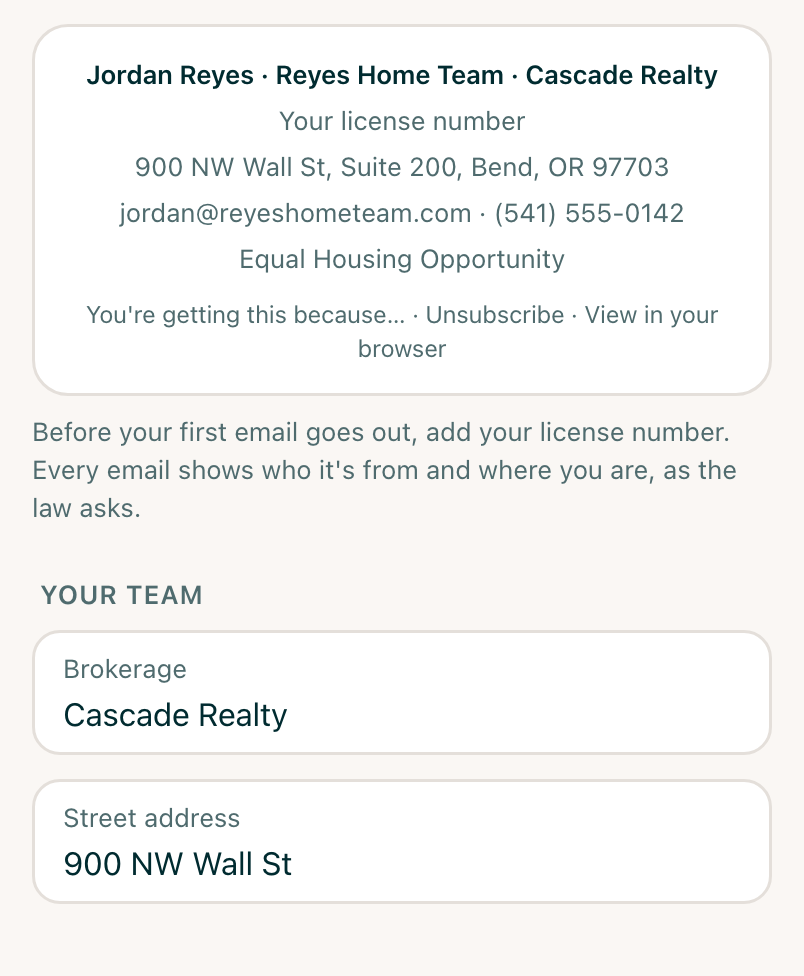
Step 3Add your license number
Everyone does this part, even on a team: the license line is always the sender's own. Under Your license, pick Add my license number and type it, like DRE #02012345. If your state doesn't ask for one, pick My state doesn't require it.
Step 4Save
Tap Save. If something's still missing, you see Saved. Your footer still needs a few things. Changed something by mistake? You can undo it from History.
Examples
- You moved to a new brokerage. Change Brokerage and the address, and every email from now on says so.
- Your new teammate's first newsletter is waiting. She opens Footer and adds her own license number. The team's address is already there.
My email's From says "Add your license number"
The email's From row and sheet say what the footer is missing, but they don't open this screen yet. Tap More, then Settings, then Footer, fill it in, and go back to the email: the row clears on its own.
Why can't I change the brokerage or address?
Only team owners can. Members see them, with the name of an owner to ask.
Do I need a street address?
You need a mailing address. A PO box or your brokerage's office is fine. See Unsubscribes, bounces and spam reports for why every email has one.