Text your event invitations one by one
Send each guest their client event invitation as a personal text with their own RSVP link, add Avery's personal opening lines, and remind anyone who hasn't answered.
On Send invitations, each guest on your list has a row with a send button. One tap texts them the invitation from your phone (or your team line), with their own RSVP link, so it reads like a personal text, not a mass email. Avery adds a short personal opening line for guests she knows something about, and you see every line before it goes. Open the event and tap the Invitations row to get there.
When you'd use it
- Your sphere is 40 past clients who answer texts faster than email. Text them one by one between showings.
- Maya just told you her son Leo turned 6. Avery's line for her says "Leo is going to love the cocoa bar this year", and you send it as is.
- Three days before the party, half the list hasn't answered. Tap Remind on each of them.
Step 1Open Send invitations
Open the event and tap Invitations. (Right after making the invitation, Next on Ask your guests brings you here.) The top shows how many are sent and how many are left.
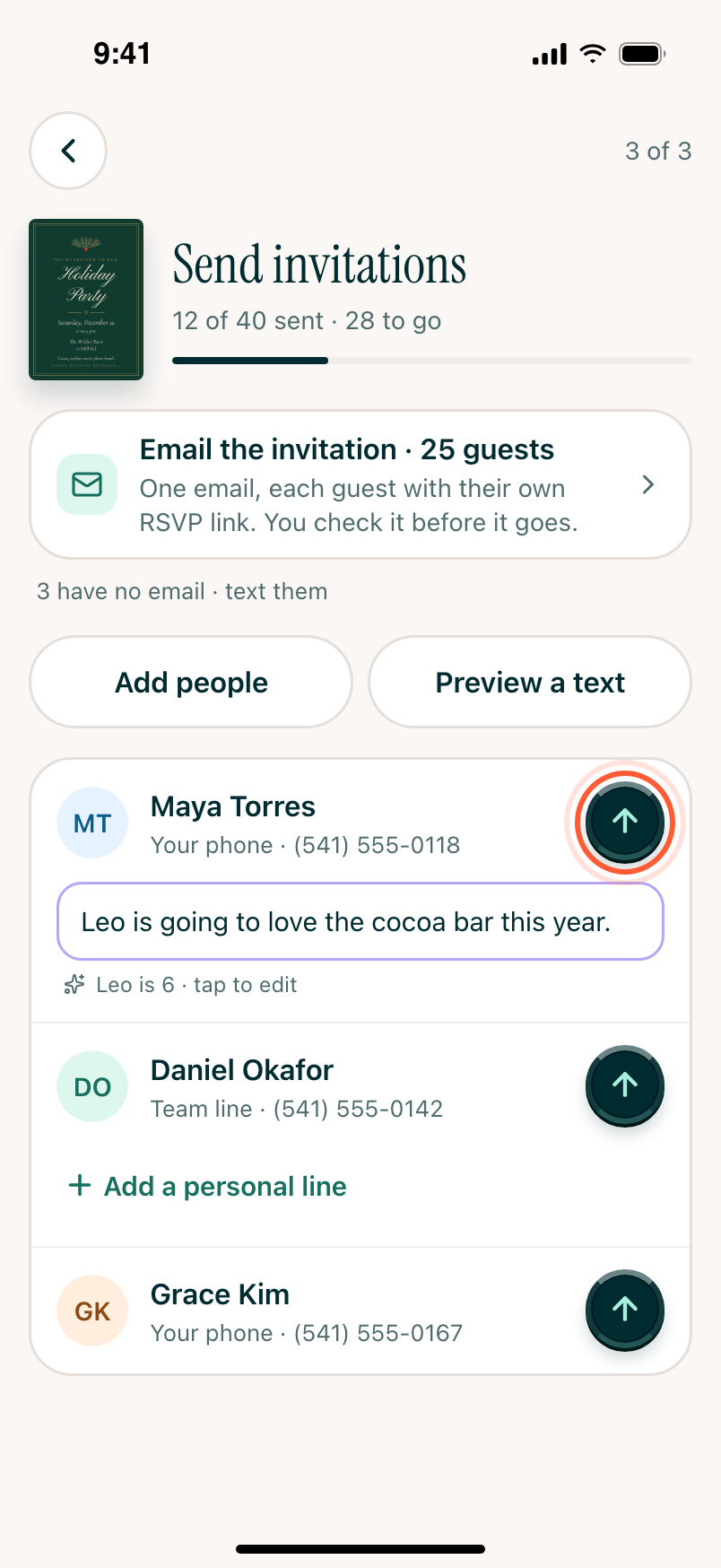
Each row says how the invitation will go:
- Team line: they've texted your team line before, so it goes from there, inside AveryIQ.
- Your phone: it opens Messages with the text ready, and you tap send.
- Email: no mobile number, so it goes by email instead: from AveryIQ if you've connected Gmail, or from your phone's Mail app if not.
- No phone or email: the row says Can't reach. Add a number or email on their page and it gets a send button.
Step 2Check Avery's lines
A guest Avery knows something personal about gets a lilac box with her opening line and why she wrote it, like "Leo is 6". It goes right after "Hi Maya!". Tap it to change it, say it with the mic, or clear it. For anyone else, tap Add a personal line to write your own.
Most guests get no line, and that's on purpose. Avery writes one only when she knows something that fits.
Step 3Send each one
Tap the send button on a row.
- From your phone, Messages opens with the text. Send it there and the row moves to Sent. If you cancel in Messages, nothing is marked sent.
- From the team line (or Gmail), it goes from AveryIQ after a few seconds. Tap Undo on the message at the bottom to take it back.
To see the exact words first, tap Preview a text.
Step 4Remind who hasn't answered
Under Sent, a guest who hasn't answered shows Opened, no answer yet or Not opened yet, and a Remind button. Tap the words to preview the reminder, then tap Remind to send it:
Hi Maya, just making sure you saw the invitation to the Holiday Party on Saturday, December 12.
RSVP here: (her link)
Add someone later
Tap Add people at the top of Send invitations. New guests join the list as not sent, ready to text.
Questions people ask
Can I email everyone instead of texting?
Yes. Tap Email the invitation at the top of the screen. It's one email with each guest's own RSVP link. See Email your event invitation.
Why does someone say Team line and someone else Your phone?
The team line is used only for people who have texted it before, so your invitation comes from a number they know. Everyone else gets it from your own phone. See Your number or a team number.
Does Avery send invitations for me?
No. Avery only writes the personal lines. Each invitation goes when you tap send on it.