How Avery learns to text like you
For your first weeks in AveryIQ, follow-ups open with an empty YOUR TEXT box so you write in your own words. Avery learns your style from them, then offers to draft your texts.
When you're new to AveryIQ, Avery doesn't put her words in your mouth. Your follow-up texts start with an empty YOUR TEXT box, and you write them yourself. Avery compares what you write with what she would have written, and learns how you text. The Learning your style pill on your deck shows how far along she is. After about 25 texts she offers to draft them for you, and you choose Draft them for me or I'll write my own.
Step 1Write your own text
Open Tasks and tap Start today's deck. A follow-up card shows YOUR TEXT with a line about what to say, like "Ask how the garden is coming along, two years in."
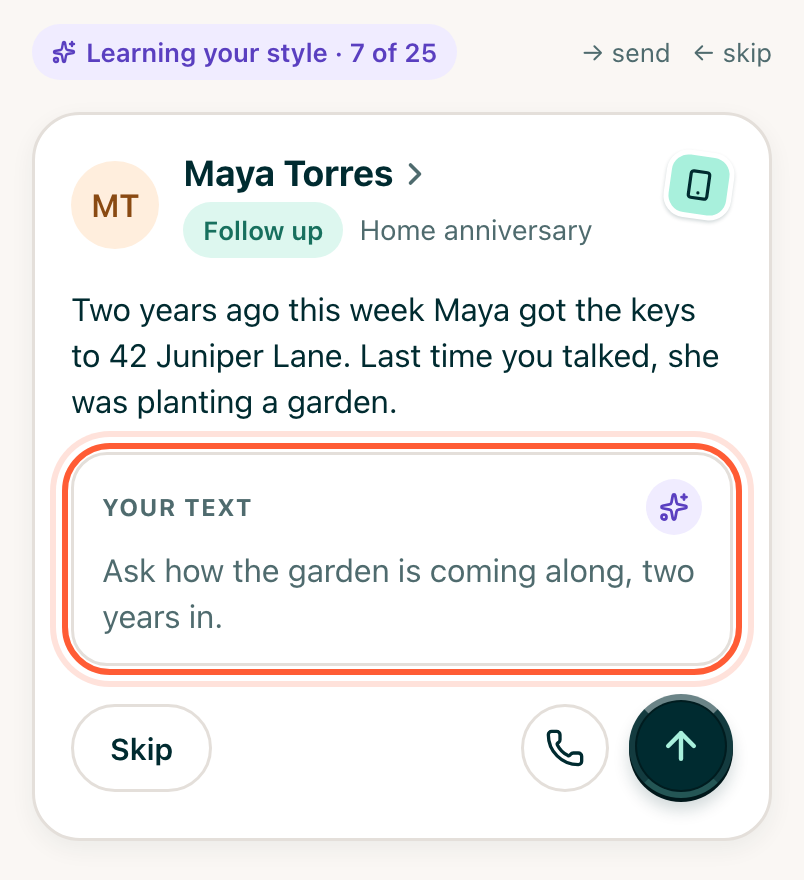
Tap the box, write it your way, then send it as usual. Want to see what Avery would say? Tap the ✦ in the box's corner and her draft appears. Change it, or send it as it is.
Step 2See how far along she is
Above the card, the pill says Learning your style · 7 of 25. Tap it. Avery is learning your style shows your progress and Your writing style so far:, the habits she's noticed, like "Signs off with just your first name." Tap Open Writing style to read or change that page in Avery's memory.
Step 3Choose when she's ready
Once she's learned enough, the pill says Avery can draft your texts, and the sheet opens by itself. It shows your writing style, then:
- Draft them for me: your follow-ups come with Avery's text ready, written the way you write. You can still change any of it before you send.
- I'll write my own: you keep writing them. She asks once more after another 25 or so texts.
Change your mind later
Tap More, then Settings, then Avery's memory. Under You, tap Writing style. Turn Avery drafts my texts on or off.
How does Avery keep learning?
After she starts drafting, Avery keeps learning from what you send. When you change a draft before sending, or clear it and write your own, she notices. A habit she sees on more than one day, with more than one person, goes on your Writing style page. The page then says ✦ Avery changed this, with Undo if you don't want it.
When you'd use it
- Your first week: you write five quick texts to past clients each morning, and by week three Avery has your "Hey" and your sign-off down.
- You always mention the kids by name. After a few texts, that's on your Writing style page, and her drafts start doing it.
- You'd rather always write your own: tap I'll write my own, and use the ✦ only when you're stuck.
Why don't I see Avery's draft?
Because she's still learning your style. Tap the ✦ in the corner of the YOUR TEXT box to see it, or turn on Avery drafts my texts on the Writing style page.