Avery's memory: teach Avery how you work
Avery's memory in AveryIQ holds a few short pages about how you work, like your writing style and how you follow up. Avery reads them before every draft. Tell her what to change, or edit a page yourself.
Avery's memory is a few short pages about how you work: who you are, how your texts should sound, how you follow up, and how you like her to answer you. She reads them before every draft and every answer, and adds to them as you work together. Tap More, then Settings, then Avery's memory.
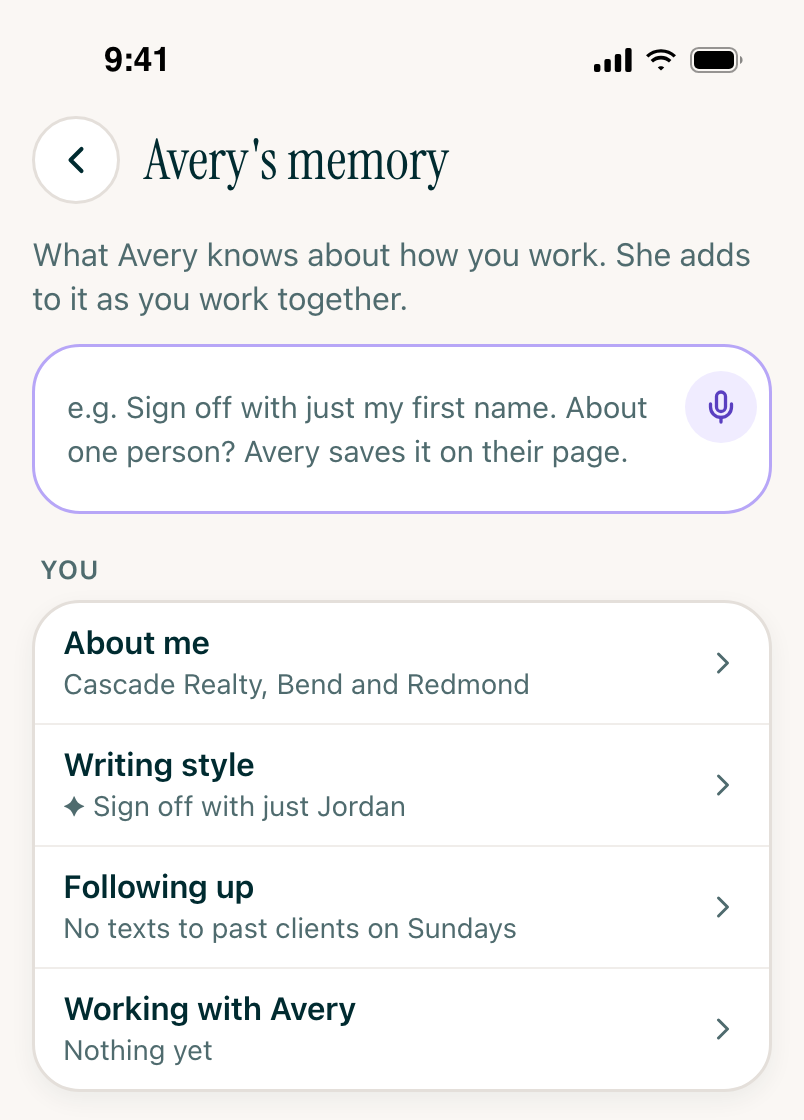
What's on each page?
- About me: your brokerage, your areas, your week, the words you use.
- Writing style: how your texts and emails should sound. Tone, length, how you sign off, words to use or avoid.
- Following up: when and how to follow up with people who go quiet, and when to stop.
- Working with Avery: how you like her answers, and what to ask before doing something.
Under Your team are the team's own About the team, Writing style and Following up, for everyone. Where yours say otherwise, yours win. How you do things shows up once Avery writes down how you handle a job you do often.
Step 1Tell Avery
Type or tap the mic in the box at the top, like "Sign off with just my first name," then tap Tell Avery. She puts it on the right page and says where: Saved to Writing style. Tap Open to see it, or Undo.
Team owners also choose Just me or Whole team.
Something about one person, like "Maya hates phone calls"? Avery saves it on Maya's page instead and links you there.
Step 2Or edit a page yourself
Tap a page, then Edit. Write one thing per line, then tap Save. Only a team owner can change the team's pages.
Turn Avery's drafts on or off
Open Writing style under You. The switch Avery drafts my texts is there. Off, your tasks start empty for you to write, and she learns your style from what you send.
When you'd use it
- Avery's drafts sound too formal. Tell her: "Keep texts short and casual, no exclamation marks."
- You never text past clients on Sundays: put it in Following up.
- You go by "Jordy" with clients: add it to About me.
- Your team signs every email "The Reyes Home Team": an owner adds it to the team's Writing style.
What did Avery change?
A ✦ in front of a page's first line means Avery changed it last. Open the page to see ✦ Avery changed this with the date, and tap Undo to put it back.
What isn't in memory?
Who's on your deck and how often is in Deck settings. Days off are in Time away. Both are linked under Not here at the bottom of the screen. You can also open memory from Ask Avery: tap her name at the top.
What if a page is full?
Each page has a size limit. If you see "That page is full," open it, take something out, and try again.