Share local news and events with talking points
Save a local event, market update or new restaurant as a talking point in AveryIQ, and Avery works it into texts for the people in your sphere who'd enjoy it. A reason to reach out that isn't "just checking in."
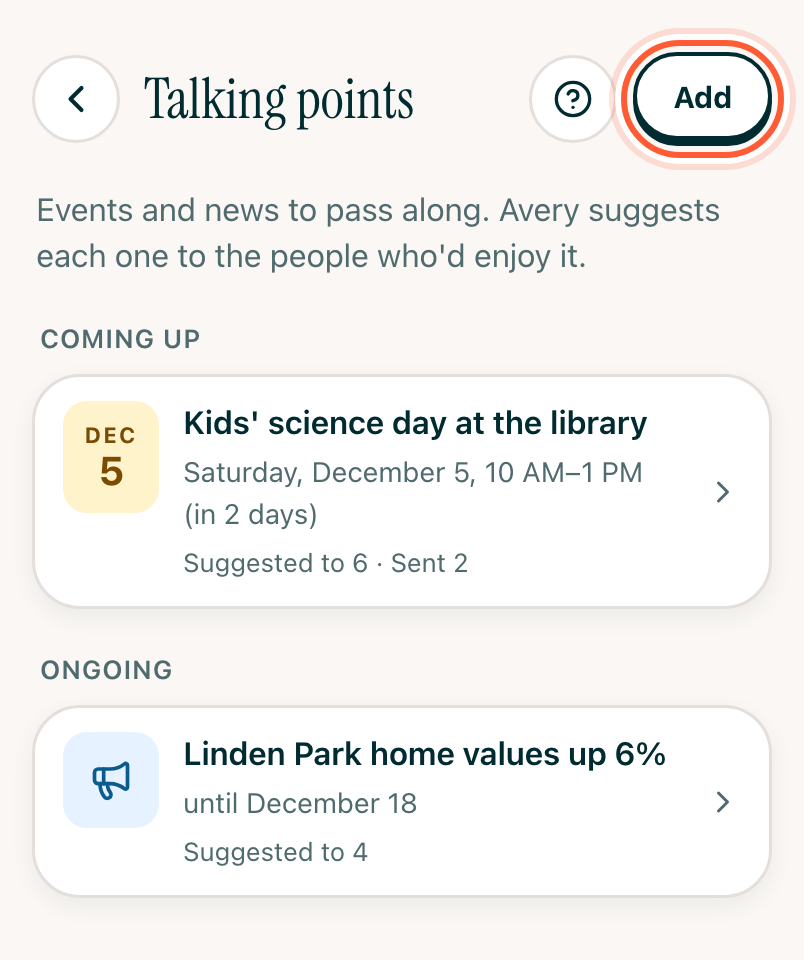
A talking point is something worth passing along: a free kids' event Saturday, home values up in a neighborhood, a new ramen place. Save it, and when someone who'd enjoy it comes up in your deck, Avery works it into their text. Find them under More, then Talking points.
Step 1Open Talking points
Tap More, then Talking points. The first time, pick a starter: An event, Market news or New in town. After that, tap Add.
Step 2Tell Avery what it is
Under What's worth passing along?, do one of these:
- Type it: "The library's doing a free kids' science day Saturday, 10 to 1, ages 5 to 10."
- Paste the event's link.
- Tap Say it instead and talk.
- Tap Screenshot and pick a picture of the flyer or the post.
Tap Fill it in. Avery reads it and fills in the title, date, time, link and details. Rather type it all? Tap Fill it in yourself.
Step 3Check it and save
Fix anything that's off. Details matter most: Avery only says what's written there, so add who it's for ("ages 5 to 10") and anything people need to know. Tap Save.
If Avery found more than one thing, like a newsletter with three events, tap Save, then the next, or Skip this one.
Avery offers it starting with your next deck. An event runs until it's over. News without a date runs for about three weeks.
See who it went to
Tap a talking point to see Suggested to: each person, and whether it's On today's deck, Sent, Passed or Not sent. On a deck card, the Talking point tile opens it.
Stop or change one
- Edit: change the words or the date.
- End now: Avery stops suggesting it, with Undo.
- Delete talking point: gone from your list. This can't be undone. Cards already in your deck stay.
Forward newsletters
If you have an Avery email address, the screen shows Forward newsletters to it. Forward your city's or chamber's newsletter and Avery pulls out the events.
When you'd use it
- The farmers market opens for the season: past clients with kids get a text about it.
- Your monthly market numbers are out: "Linden Park home values are up 6% this year" goes to homeowners there.
- A page needs a login, like a Facebook event: take a screenshot and add that instead.
Does Avery send these to everyone?
No. She picks the people it fits, from what she knows about each one, and you still tap send on every text. Tell Avery more about people, like "Maya has twins in first grade," and she matches better.