Tell Avery how a call went
After a call Avery didn't hear, AveryIQ asks "How did it go?" Say a few words and Avery saves the call notes, updates their profile and adds any follow-up to your tasks. Or tell her you didn't reach them and send the text she wrote.
When Avery couldn't hear a call, like one from your own phone or a team-line call that wasn't recorded, she asks how it went. Tap ✦ How did it go? Tell Avery under the call in their conversation, or the notification that comes about ten minutes after the call. Say a few words, and Avery saves them as call notes for your team, updates their profile, and turns anything you promised into a task. Nothing you say here is ever texted to them.
Step 1Open How did it go?
Open the person's conversation in Messages. Under the call, tap ✦ How did it go? Tell Avery.
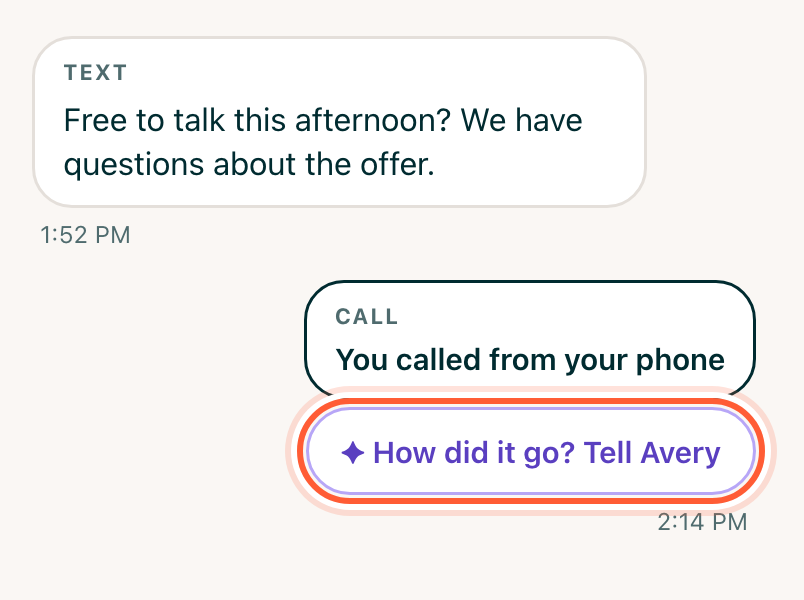
Or tap the notification "How did it go with Maya?". Both open the same screen.
Step 2Pick what happened
How did it go with Maya? shows two choices:
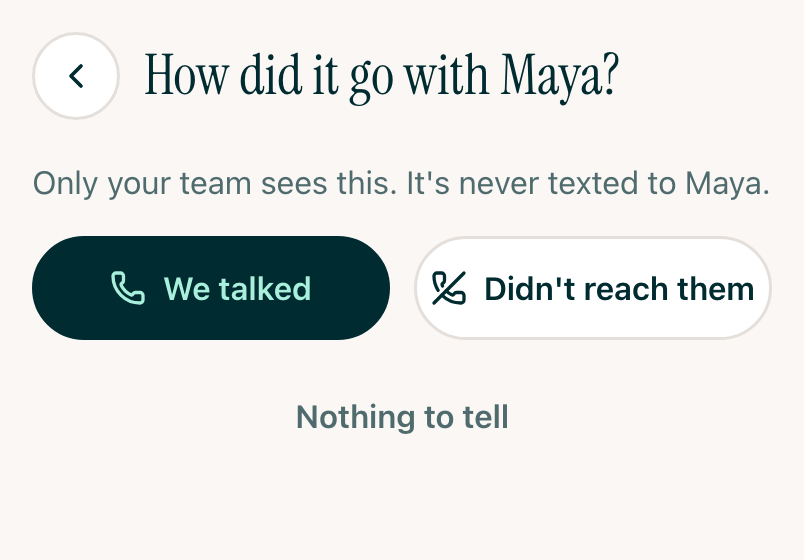
- We talked: Avery starts listening (see the next step).
- Didn't reach them: Avery offers a text instead (see step 4).
- Nothing to tell: closes it, and Avery stops asking about this call.
Step 3Tell Avery what you talked about
Talk the way you would to an assistant: what you discussed, what happens next, anything they asked you to do. If you get stuck, tap one of the ideas under STUCK? TRY ONE OF THESE, like What happens next. Tap Done when you're finished.
Rather type? Tap Type instead, write in What did you talk about? and tap Save for your team.
You'll see "Avery will remember that". Then Avery:
- saves what you said under the call, marked Call notes, where your team can read it;
- adds what she learned to their page, like a new budget or a move date;
- adds a task for anything you said you'd do ("send her the comps Friday").
Step 4Didn't reach them? Send a follow-up text
Tap Didn't reach them. Under Follow up with a text?, tap Text Maya. Her conversation opens with a text Avery wrote while the phone rang, waiting in the box. Read it, change anything, and send it. Tap No text to skip it; AveryIQ notes that you tried.
When you'd use it
- You called Daniel from your car. Back at your desk, tap the notification and say "He's pre-approved to 650, wants to see Juniper Lane Saturday."
- Grace didn't pick up. Tap Didn't reach them, then Text Grace, and send "Just tried calling, no rush. Call me when you're free."
- You called three past clients in a row. Each call gets its own ask, so you can debrief them one by one.
Why doesn't Avery ask after every call?
When a team-line call is recorded, Avery already heard it, so she writes the summary herself. See Find a call's recording and summary. Calling the same person twice before you answer gives you one ask, for the newer call.
Made a mistake?
Call notes are like any other note on their page. To fix what Avery learned, open their page, then Notes, and tap the note to see and undo each change. See Add a note about someone.