Ask Avery anything
Ask Avery is your private thread with Avery in Messages. Ask about your people, deals and open houses, add leads from a screenshot, save notes and tasks, or change settings, by typing or talking.
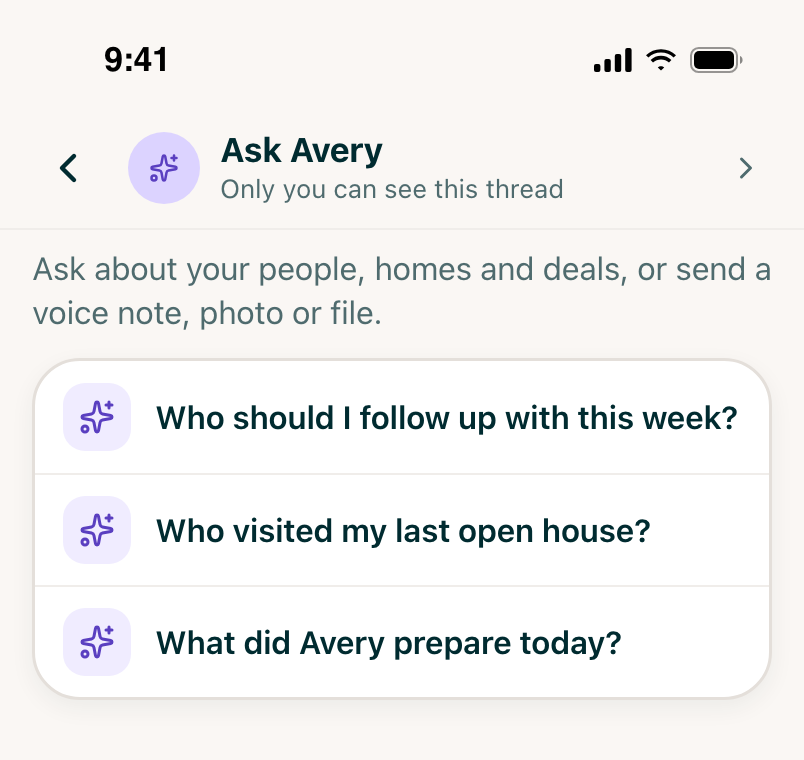
Ask Avery is your private thread with Avery. Ask her about your people, homes and deals, or ask her to do something: add a lead, save a note, set a task, change a setting. Type, talk, or send a photo or file. Only you can see it. Open Messages and tap Avery, always first in the list.
Step 1Ask
Type in the Ask Avery box and tap send. Rather talk? Tap the mic in the box and your words appear as you speak, or tap the voice note button beside it to send a recording. The camera and + send a photo, screenshot or file. New here? Tap one of the questions she offers to start.
While she works you see ✦ Avery is thinking…. Her answer links the people and records she names: tap one to open it.
Step 2Check what she did
When an answer changes something, the change is listed under it, like ✦ Created a task for Lee. Tap a line to open what she made.
If she needs to know more ("Which Sam?"), she asks in the thread. Tap an answer or type it. Before she deletes or merges anything, she asks you to say yes first, with Cancel beside it.
What can I ask?
| To... | Say something like |
|---|---|
| Find people | "Past clients I haven't talked to since summer" |
| Add a lead | "Add Grace Kim, 541-555-0188, wants a 3-bed under $600k" |
| Save what you learned | "Maya's lease ends in March and she wants a yard" |
| Set a task | "Remind me to call Daniel tomorrow at 3" |
| Hand off work | "Have Sam send the Patels the disclosures" |
| Check your day | "What did Avery prepare today?" |
| Ask about a deal | "When is the inspection deadline on 42 Juniper?" |
| Open houses and events | "Who visited my last open house?" "Who RSVP'd to the pie pickup?" |
| See how an email did | "Who clicked last month's newsletter?" |
| Make a group | "Make a group of past clients with dogs" |
| Share local news | "The library has a kids' science day Saturday" |
| Change a setting | "Make my deck 20 minutes" or "I'm off next week, Sam covers" |
| Teach her your style | "Always sign my texts with just Jordan" |
| Learn the app | "How do I set up a team number?" |
She also reads what you send her: a screenshot of a lead becomes a new person, a listing PDF or a link becomes something she can use, and a spreadsheet of up to 150 people becomes contacts.
When you'd use it
- Driving home from a listing appointment, you say: "Text the Okafors Thursday about the comps." She saves the task for Thursday.
- A lead DMs you on Instagram. You screenshot it and send it to Avery with no words. She adds them.
- Before a busy Saturday, you ask "Who has a birthday this weekend?"
What can't Avery do?
She can't send texts or emails, place calls, send event invitations or draw a giveaway winner. You do those in the app. She'll say so if you ask.
What if she got it wrong?
Tell her: "That's the wrong Sam." She checks what she changed and fixes it. Or tap the change under her answer and fix it there. Anything she changes about a person is also under History and settings on their page.
Is this thread private?
Yes. Only you see your Ask Avery thread. What she saves to people, tasks and deals is shared with your team as usual. To ask Avery where your team can see, type @Avery in a deal's thread or a message to a teammate.
To see what she remembers about how you work, tap her name at the top of the thread. That opens Avery's memory.