Ask your guests questions on the RSVP
Add questions to your client event's RSVP page, like which pie they want or their kids' ages, and save the answers to each person in your real estate CRM so Avery remembers them.
When a guest says yes on their RSVP page, they can answer a few questions you choose: which pie they want, any allergies, their kids' names and ages, their birthday. You see everyone's answers on the event's page, and answers you choose to remember go on each person's profile, where Avery reads them like a note. Questions are step 2 of making the invitation, on Ask your guests.
When you'd use it
- A pie pickup: "Which pie would you like?" with Apple, Pumpkin, Pecan and Surprise me, so you order the right pies.
- A holiday party: "Kids coming? Their names and ages help us plan." Avery remembers the kids for your next touch.
- Any event: "When's your birthday? We like to send a card." The party fills in the birthdays your database is missing.
Where do I find it?
Open the event and tap Questions under the Invitations row. While you're making the invitation, it's the screen after your words.
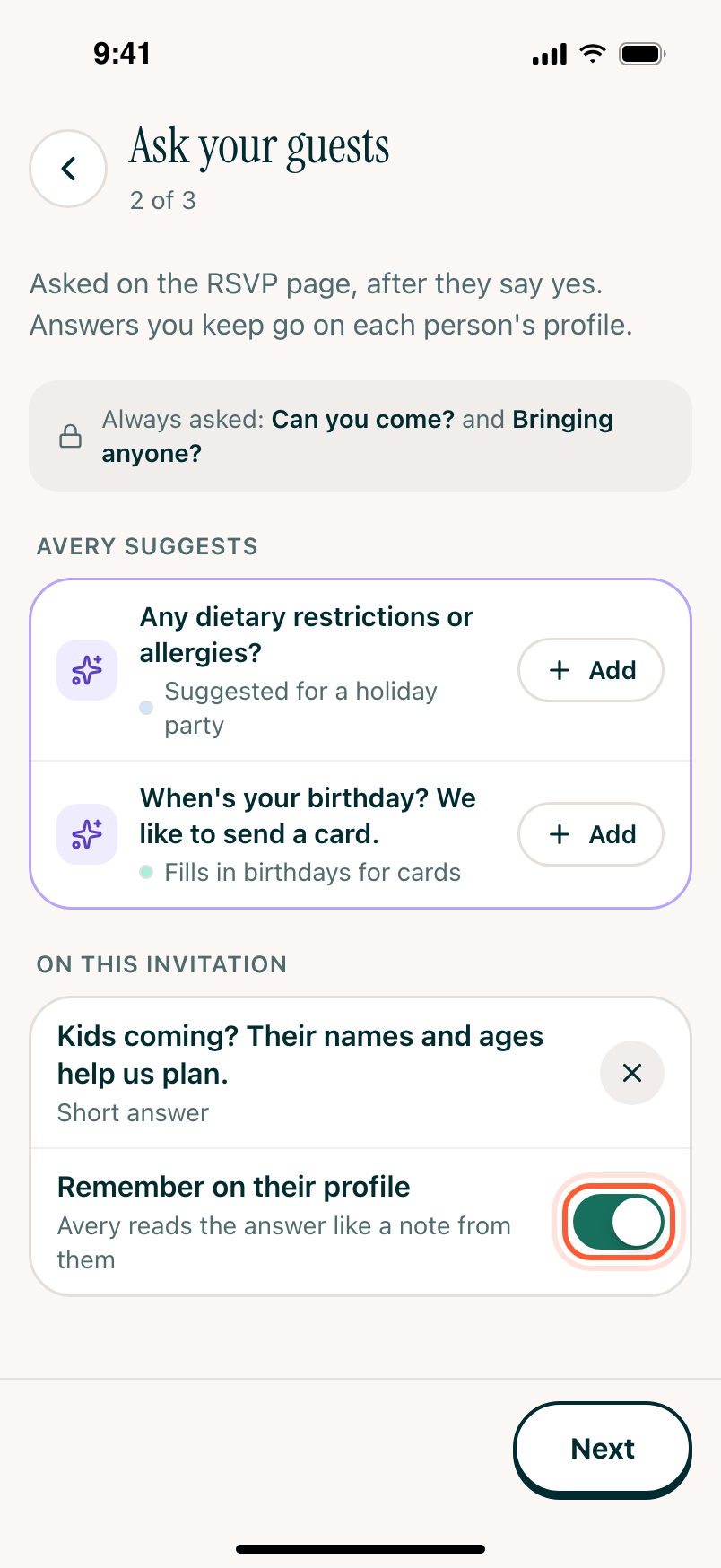
Every RSVP page always asks Can you come?, and Bringing anyone? when guests can bring someone. An invitation starts with no other questions, which keeps the RSVP quick. Guests answer your questions only after they say yes.
Add a question
- Avery suggests lists up to four questions picked for this event: one for the kind of event, one from your note, and two that fill gaps in your database, like birthdays or mailing addresses. Each says why. Tap Add.
- More questions has common ones, like Dietary needs, Kids coming and Moving plans. Tap one to add it.
- Write your own opens a blank question.
Write your own question
- Type Your question, or tap the mic and say it.
- Under Guests answer with, pick Short answer, Pick one or Pick any.
- For choices, type each one. + Add a choice adds more, up to 12.
- Turn on what you need:
- Add "Something else" lets guests write their own answer.
- Guests must answer makes it required. Leave it off to keep the RSVP quick.
- Remember on their profile saves the answer to the person.
- Check Guests see at the bottom, then tap Add.
Should I remember the answers?
Turn Remember on their profile on for anything about the person: kids, birthday, moving plans, address. Avery reads the answer like a note from them, so it shows up in her drafts later. Turn it off for one-time answers like "Red, white or both?". Those stay on this event's guest list only.
Change or remove a question
Tap a question to edit it, or tap × beside it to remove it. Once guests have answered, their answers stay as they are, and a choice someone picked can't be removed.
Where do I see the answers?
On the event's page, under What guests told you, each question shows a count for each choice, or guests' own words. Tap one to see who picked what, and tap a name to open that guest's RSVP. See Track RSVPs and who came.