Share a sign-up link for your client event
Turn on one public sign-up link for your client event to post on Facebook, put in a newsletter or print as a QR sign. Anyone can sign up, and new people land in your real estate CRM.
A sign-up link is one public link for your event that anyone can open, from a Facebook post, your newsletter or a QR sign at the office. People sign up with their name and mobile number, answer your RSVP questions, and land on the guest list as going. Someone new to you is added to your database, so the event grows your sphere. Turn it on from the Sign-up link card on the event's page.
When you'd use it
- A pie pickup you post in your neighborhood Facebook group, so neighbors you don't know yet can grab a pie and meet you.
- A shred day flyer with a QR code on it, taped up in the mailroom of a condo building you farm.
- A guest invites a friend: after they RSVP yes from the link, their page has an Invite a friend button that shares it.
Invitations are still the best way to reach your own sphere, since each one is personal. The link is for everyone else.
Turn it on
Make the invitation first: the sign-up page shows its card, note and questions. Then, on the event's page, find Sign-up link and tap Turn on sign-up link. Tap Preview beside it any time to see the page.
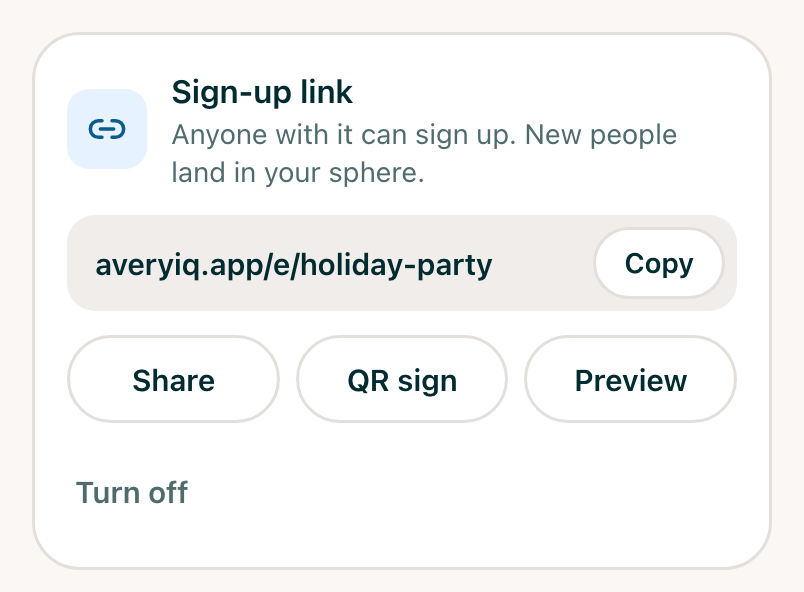
Once it's on:
- Copy copies the link to paste into a post or an email.
- Share opens your phone's share sheet.
- QR sign shows a QR code people scan with their phone's camera.
- Preview shows the sign-up page as a stranger sees it.
What do people fill in?
The page shows your card and note, then About you: First name, Last name, Mobile phone and an optional Email, with a checkbox agreeing that you can text and email them. Then your questions, and how many they're bringing if guests can bring someone. They tap Sign me up.
Where do sign-ups show?
On the event's page, people who signed up show from the link under their name, and someone new to your database gets a New label. They're in People too, with the event as how they came in. After the event they get the same thank-you or "we missed you" as invited guests.
Turn it off
Tap Turn off, then Turn off the link. Anyone who opens the old link sees that sign-ups are closed. Everyone who signed up stays on the guest list. Tap Turn on sign-up link to open it again; the link may be new, so copy it again before you share it.
Does someone who's already in my database get added twice?
Not when their name and mobile number match someone you have: the sign-up goes on that person. If they type their name differently, AveryIQ may add a second person, and you can merge the two.