Sign up for AveryIQ and start your free trial
Start an AveryIQ free trial in your web browser at averyiq.com/start. Answer five questions, add your name, mobile and work email, then a card. 14 days free, then one price for your whole team.
You sign up for AveryIQ in a web browser, on a computer or in your phone's browser, at averyiq.com/start. You answer five quick questions, enter your name, mobile number and work email, type the code we email you, and add a card. The trial is 14 days free with $0 due today. After that it's $250 a month or $2,500 a year for your whole team. The iPhone and Android apps only sign you in, so sign up first, then open the app.
Joining your team? Don't sign up
If your team already uses AveryIQ, ask its owner to invite your email (see Invite your team), then install the app and sign in. Signing up makes a separate workspace with its own plan. If you were invited and open signup anyway, it shows You're invited. with Join and your team's name. Tap that.
Step 1Open signup
Go to averyiq.com/start, or click Start your free trial on averyiq.com. Already have an account? Click Sign in in the top corner instead.
Step 2Answer five questions
Meet Avery, your AI coworker. asks how big your team is. Then: who you help (buyers, sellers, renters), where leads find you, how you keep track today, and where you need help most. Pick your answers and click Continue after each. Your answers help Avery know where to start. They don't change the price.
Pick A CRM under "How do you keep track today?" and you can choose which one, like Follow Up Boss or KW Command. You bring your contacts over later (see Switch to AveryIQ from another CRM).
Step 3Claim your workspace
On Claim your workspace., type your First name, Last name and Mobile phone. Team or business name (optional) is your team's name, like "Reyes Home Team". Leave it empty and AveryIQ uses your name.
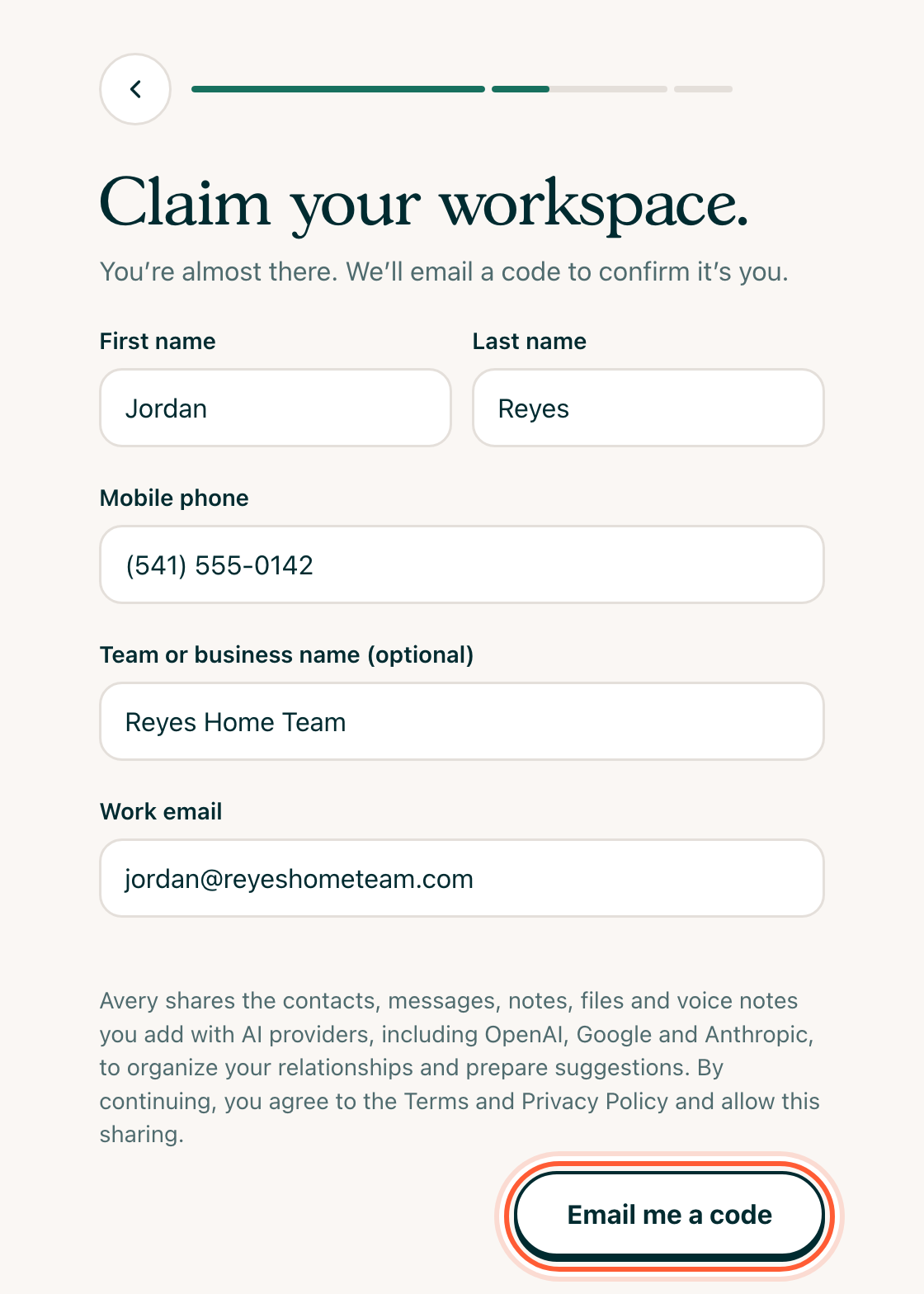
Work email appears once your name and phone are in. Use the email you'll sign in with on your phone. Click Email me a code.
Step 4Type the code
Check your inbox. shows the email it went to. Type the 6-digit code. It checks as soon as the last digit is in. Nothing came? Check your spam folder, or click Send a new code. Wrong email? Click Change.
Step 5Add your card
Try Avery free for 14 days. shows the price. Pick Monthly ($250 a month) or Yearly ($2,500 a year, "save 17%"). The timeline says $0 due. today and the date of your first charge, with "Cancel any time before". Enter your card in the secure form and confirm.
Had a trial before? This page says Choose your plan. instead, and you're billed today.
Step 6Get AveryIQ on your phone
You're in. shows a QR code. Scan it with your iPhone's camera and AveryIQ opens already signed in. Or click Email the sign-in link to my phone. Don't have the app yet? Follow Install AveryIQ on your iPhone.
Signed up in your phone's browser? Tap Open App instead.
To keep working on the computer, click Continue on the web. Want help getting set up? Click Schedule an onboarding session.
Next: Get started with AveryIQ in 20 minutes.
If something goes wrong
- "Something went wrong." Click Try again. Your answers are saved in that browser, so you don't start over.
- "That code didn't work. It may have expired." Click Send a new code and use the newest email.
- "Stripe is still confirming your payment." Wait a moment and click Check again.
- "Your team is almost ready." Someone else on your team started the workspace. Ask them to finish setting up.
When you'd use it
- You're a solo real estate agent trying AveryIQ for the first time: sign up at your desk, then scan the QR code before your first showing.
- You run a small team: you sign up as the owner, then invite your teammates and your virtual assistant from the app. One price covers everyone.
- Your assistant is setting it up for you: have them sign up with your work email, since that's the email you'll sign in with.
Can I sign up in the iPhone app?
No. The iPhone and Android apps only sign in. Sign up in a browser, even your phone's, then sign in on the app with the same email.
Do I pay for each person on my team?
No. One price covers your whole team. See Your AveryIQ plan and billing for receipts, changing your card and cancelling.