Waiting on them: tasks where someone else has the next move
In AveryIQ, set a task to Waiting on them when a client, lender or inspector owes you something. Pick when to follow up, and the task comes back to your list that day. Avery also tracks what people promise you.
Waiting on them is for tasks where someone outside your team has the next move: a seller sending disclosures, a lender sending the approval letter. Set a task to it, say who you're waiting on and when to follow up, and it leaves your to-do list until then. On Tasks, tap the Waiting on them chip to see them all. Avery also keeps track of what clients promise you in texts, and has a follow-up ready if it doesn't come.
Step 1Set a task to Waiting on them
- On Tasks, tap the task to open it.
- Tap Status.
- Tap Waiting on them ("Someone outside the team has the next move").
Step 2Say who and when
- Under Waiting on, the task's person is already filled in. Tap
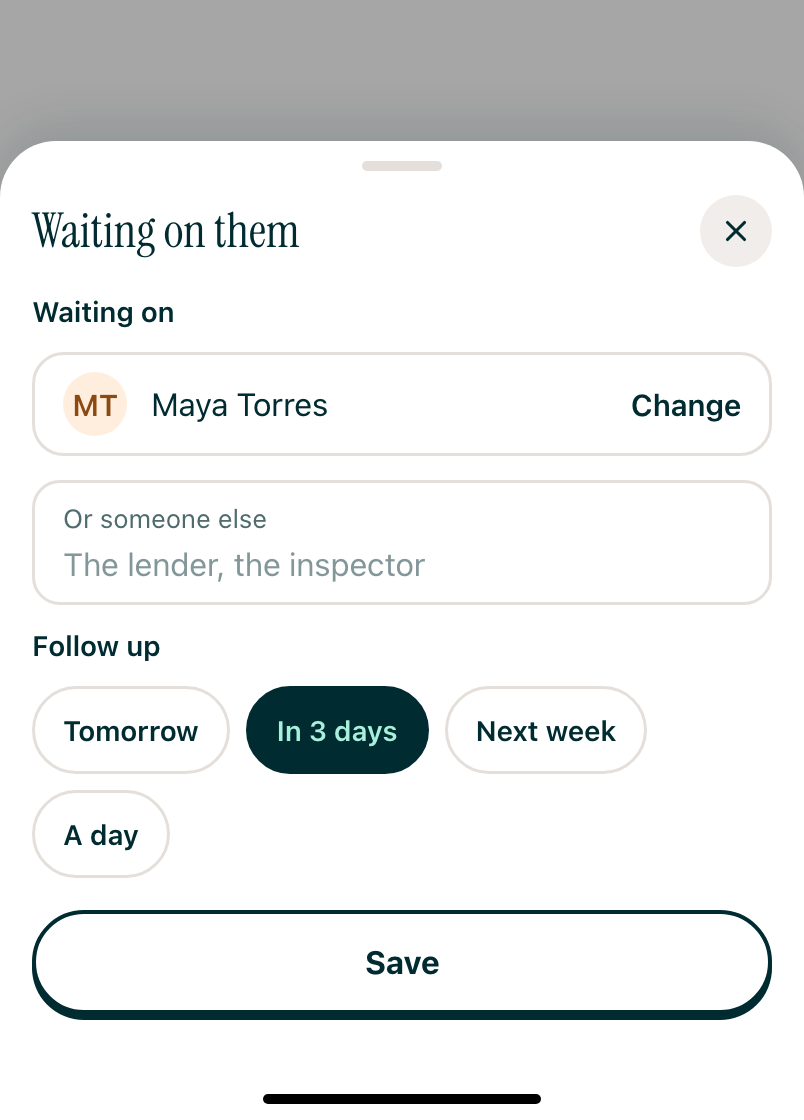
Change to pick someone else in your people, or type a name in Or someone else, like "the lender" or "the inspector". (A task with no person shows Choose a person instead.) 2. Under Follow up, tap Tomorrow, In 3 days, Next week, or A day to pick a date. 3. Tap Save.
The task's row now says something like Waiting on Maya · follow up Thu.
Step 3See everything you're waiting on
On Tasks, tap the Waiting on them chip. It shows a count, like Waiting on them · 3, with the soonest follow-up first.
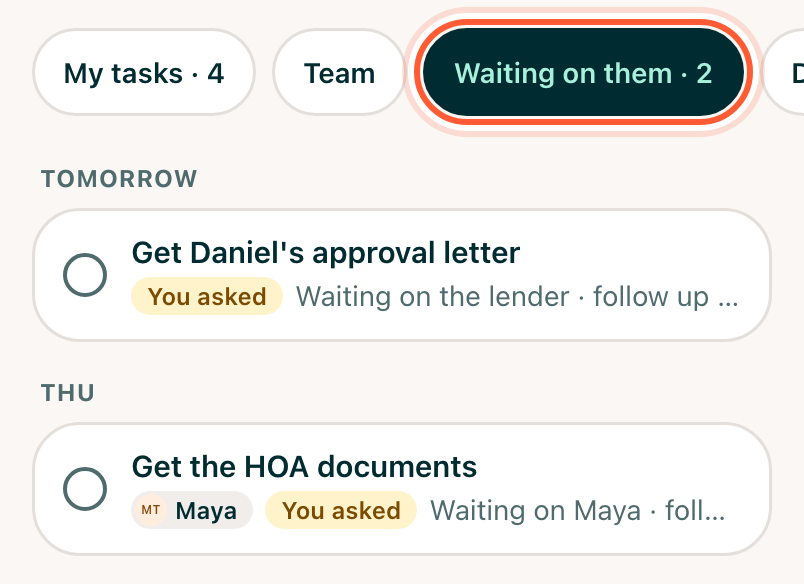
On the follow-up day, the task goes back to your list, ready to chase. Heard back early? Open the task and tap Mark done, or Follow up now to bring it back today.
What Avery waits for on her own
When someone promises you something in a text ("I'll send the pre-approval Friday"), Avery notices. Under the conversation you'll see a note like "Waiting on Maya: send the pre-approval. No reply by Friday at 5 PM? I'll have a follow-up ready."
- If Maya replies, the note goes away on its own.
- If she doesn't, it comes back at that time as Avery's suggestion, with a follow-up text already written for you to send.
- Tap the time to change it, or tap Not needed to drop it. Undo brings it back.
These show under Waiting on them too.
Example uses
- The seller said she'd send the HOA documents this week. Set the task to Waiting on them, Maya, In 3 days.
- You emailed the lender for Daniel's approval letter. Waiting on "the lender", Tomorrow.
- The inspector is booked out. Waiting on "the inspector", Next week.
Where did my task go?
A task waiting on someone leaves My tasks until its follow-up day. Find it under the Waiting on them chip. To bring it back now, open it and tap Follow up now, or change Status to To do. See See your tasks.