Your team in AveryIQ
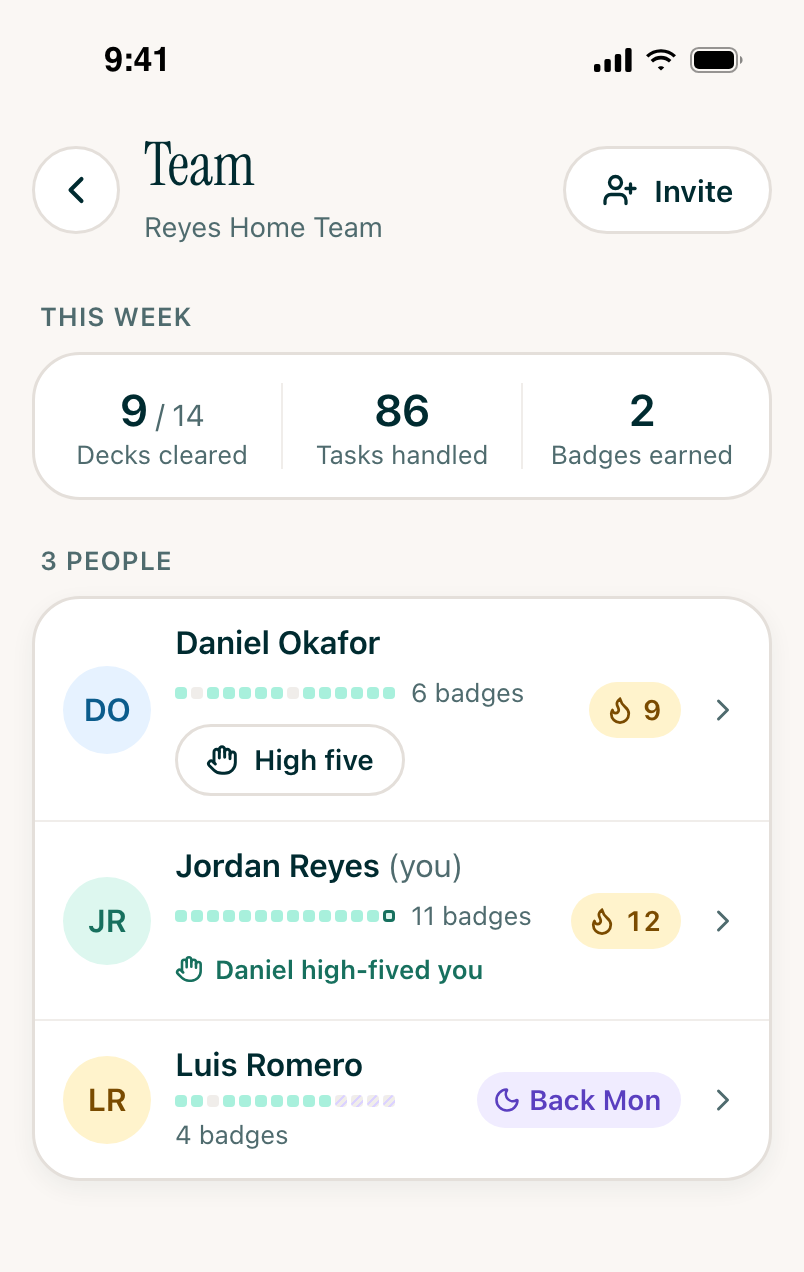
The Team screen shows this week's decks, tasks and badges, everyone's streak and a High five, and your team's name, logo and file storage. Owners invite, change roles and remove teammates.
Team shows how everyone on your real estate team is doing this week, lets you cheer each other on, and holds your team's name, logo and file storage. To open it, tap More, then Team. Everyone on the team sees the same screen; team owners also invite people and manage roles.
What's on it
- This week: decks cleared out of decks dealt, tasks handled, and badges earned, for the whole team.
- Everyone on the team, by name: the last two weeks as little squares, their badges and their streak. Someone on time away shows the day they're back instead. Tap a person to open their profile. See Your profile.
- Invited (owners): invitations that haven't been accepted yet. See Invite your team.
- Team details: Team name, Team logo and File storage, how much of your team's space deal files, photos and recordings use.
Send a high five
When a teammate has a streak going or cleared today's deck, their row has a High five button. Tap it. They get a notification, and their row says High-fived today. One a day per teammate.
Rename your team
Team owners only. Under Team details, tap Team name, type the new name and tap Save. It shows on invitations, open house sign-in pages and RSVP pages. Tap Undo on the message that appears to put the old name back.
Add your logo
Under Team details, tap Team logo. See Add your team logo.
Change someone's role or remove them
Team owners only. Tap the person, then under Role pick Member or Team owner. A team owner can also invite people, remove people, change roles and handle billing.
To remove someone, tap Remove from team at the bottom of their profile, then Remove. They lose access. Their contacts, deals and messages stay with the team. The people assigned to them aren't assigned to anyone now (leads among them wait in the team pool), and their open tasks go back to the team. Their Ask Avery conversation stays private.
Leave the team
Tap Leave team at the bottom of Team, then Leave team again. You're signed out. If you're the only owner, make someone else an owner on their profile first.
Examples
- Monday's team meeting: open Team and look at This week together.
- Your teammate Luis is on a 10-day streak. Tap High five on his row.
- Your team rebranded from "Reyes Realty" to "Reyes Home Team." Tap Team name and change it.
- Your assistant is leaving. Open her profile and tap Remove from team. Her leads wait in the team pool for someone to take.
Is the team ranked?
No. People are listed by name, not by score.
Why can't I change the team name?
Only team owners can. The screen says Only team owners can change these. Ask an owner to change your role.