Follow up after your client event
Tell Avery how your client event went, one guest at a time by voice, and she writes a personal thank-you for everyone who came and a "we missed you" for anyone who said yes and didn't make it.
After your event, tap Tell Avery how it went on the event's page. Avery shows you each guest who came, one at a time, and you say what's new with them in about 10 seconds. Each update becomes a note on that person, and Avery writes a thank-you from it. Thank-yous for everyone who came, and a "we missed you" for anyone who said yes and didn't come, then show up in your deck, ready for you to send.
When you'd use it
- The morning after your holiday party: "Maya's thinking about a bigger place once the baby comes", "Daniel's company is moving him to Denver in spring". Five minutes in the car, and every one of those goes on their page.
- A pie pickup with 60 people: you don't have something for everyone, so tap Nothing new for most and they still get a simple thank-you.
Step 1Mark who came
Tell Avery how it went shows up once the event is over and at least one guest is marked as came. See Track RSVPs and mark who came.
Step 2Tell Avery about each guest
Tap Tell Avery how it went. For each guest:
- Read What Avery knows about them.
- Tap the mic and say what's new, like "Her daughter starts at OSU in the fall." Tap it again to stop. Prefer typing? Tap Type instead.
- Tap Next (it shows the next guest's name), or Nothing new if you have nothing to add.
After the first guest you talk about, the next one starts listening on its own, so a big party goes fast.
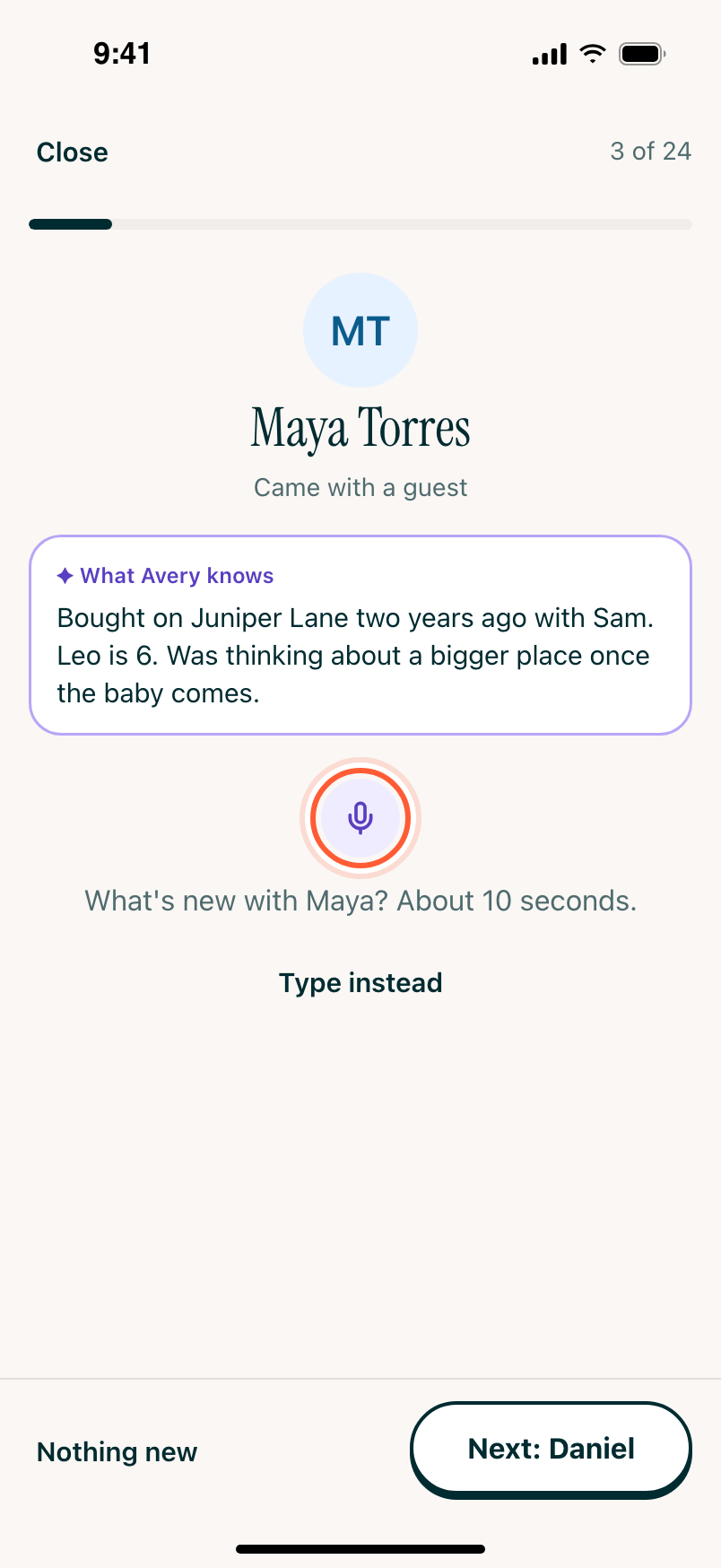
You can tap Close and come back later. Avery picks up at the first guest you haven't done.
Step 3Thank-yous land in your deck
After the last guest, Avery writes the thank-yous. They show up in your deck, up to 25 a day on top of your usual tasks, so a big party spreads over a few mornings. Each says why, like "Came to the Holiday Party. You said: ...".
- Guests who came get a thank-you, written from what you said.
- Guests who said yes and didn't come get a light "we missed you", with an easy next step like coffee.
- Guests who didn't answer or said no get nothing.
Read each one, change anything, and send it like any other task.
Done with only part of the list? On the last screen, tap Write the thank-yous to finish. Everyone you skipped still gets a simple thank-you.
Does Avery send the thank-yous herself?
No. Each one waits in your deck until you send it, edit it or skip it.
What if I forgot to mark someone as came?
Fix Who came? before you start Tell Avery how it went. Once Avery has written the thank-yous, the event's page says so, and Who came? is gone. For someone you missed, send them a text from their page.
Did a giveaway winner also come?
Winners get a "you won" message that thanks them for coming too. See Draw a giveaway winner.