Goals, connections and events on a person's page
On each person's page in AveryIQ, the goals section shows what they want to do (buy, sell, rent, refinance), Connections shows who they know, and Events shows the client events they were invited to. Add a goal yourself or let Avery fill them in.
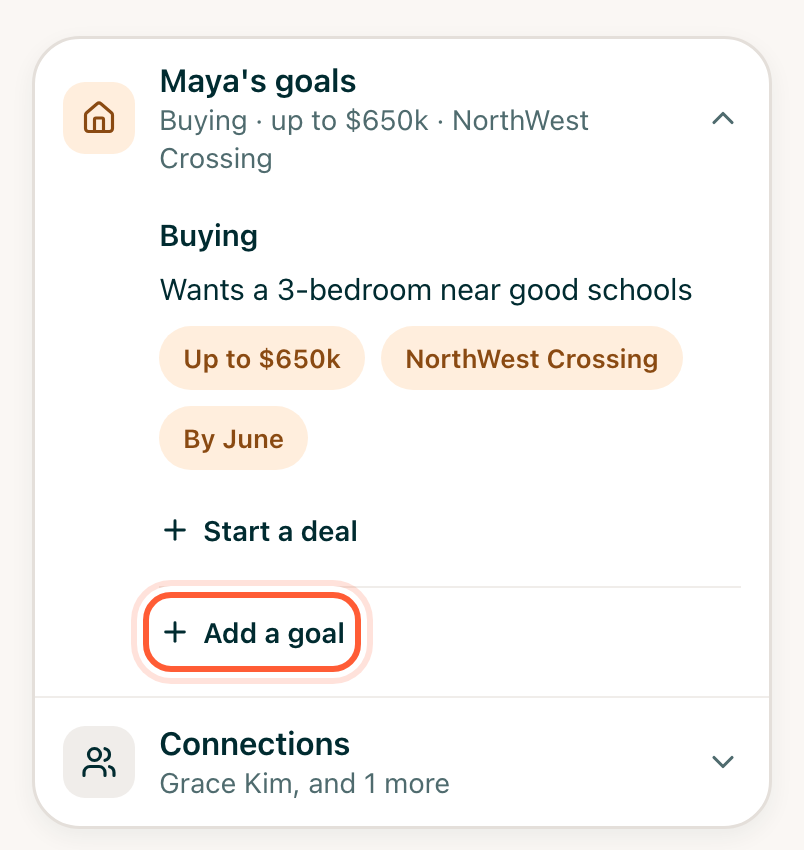
Three sections near the bottom of a person's page track their bigger picture. Maya's goals (with their first name) says what they're hoping to do, like buy a home up to $650k in NorthWest Crossing. Connections lists the people and places they're tied to. Events shows the client events they were invited to and whether they came. Avery fills these in from your notes and conversations, and you can add a goal yourself.
Add a goal
- Open their page from People.
- Scroll to Maya's goals and tap Add a goal. With no goals yet, the row says "Nothing yet" and has a +: tap it.
- Pick what kind: Buying, Selling, Renting, Renting out, Investing, Refinancing, Relocating, Renovating or Management.
- In What are they hoping to do?, type or tap the mic and say it, like "3 bedrooms near Pine Ridge, before school starts".
- Tap Add goal.
The goal shows in the section. Avery adds the budget, areas and timing as chips when she learns them.
Read a goal
- A goal Avery worked out on her own says ✦ AVERY'S GUESS. Tap it to see Why Avery thinks this, with the words it came from.
- A buying, selling or renting goal has Start a deal under it. Once there's a deal, it says Deal: and the stage instead, like Deal: Under contract. Tap it to open the deal. See Track a deal.
Remove a goal that's wrong
Tap the goal, then Remove "Buying" (with its kind). Changed your mind? Undo it from their History. See See someone's history.
Connections
Connections shows only when Avery knows of any: "Is a friend of Grace Kim", "Works at Bend Dental", "Lives with Sam Patel". Tap a person to open their page, or a place to see why Avery thinks so. Family shows in About Maya instead, and who referred them shows as Referred by at the top of the page. See What Avery knows about someone.
To add a connection, tell Avery in a note: "Maya's sister is Hannah Brooks."
Events
Events shows each client event they were invited to, with the date and how it went: Going, Can't make it, Invited, Came, or after it's over, Said yes, didn't come. Tap one to open the event.
When you'd use it
- A past client mentions refinancing at a party. Add a Refinancing goal so it's there when rates drop.
- Before calling Daniel, open Daniel's goals to check his budget and timing.
- Planning your next client party: open Events on Grace's page to see whether she came last time.
- Avery's guess says Luis is Selling, but he told you he's staying. Tap it and remove it.