Notify me about, Mute and Pin a conversation
Choose what one AveryIQ conversation or deal thread notifies you about (Everything, Mentions or Nothing), mute it, or pin it to the top of Messages. These change it for you only.
Every conversation and deal thread has its own notification setting. Open it, tap ⓘ at the top right, and under Notify me about pick Everything, Mentions or Nothing. Mute is a one-tap Nothing, and Pin keeps it at the top of Messages. Each choice is yours alone: your teammates' notifications don't change.
Step 1Open the details
Open the conversation from Messages, or a deal's thread, and tap ⓘ at the top right. Details opens.
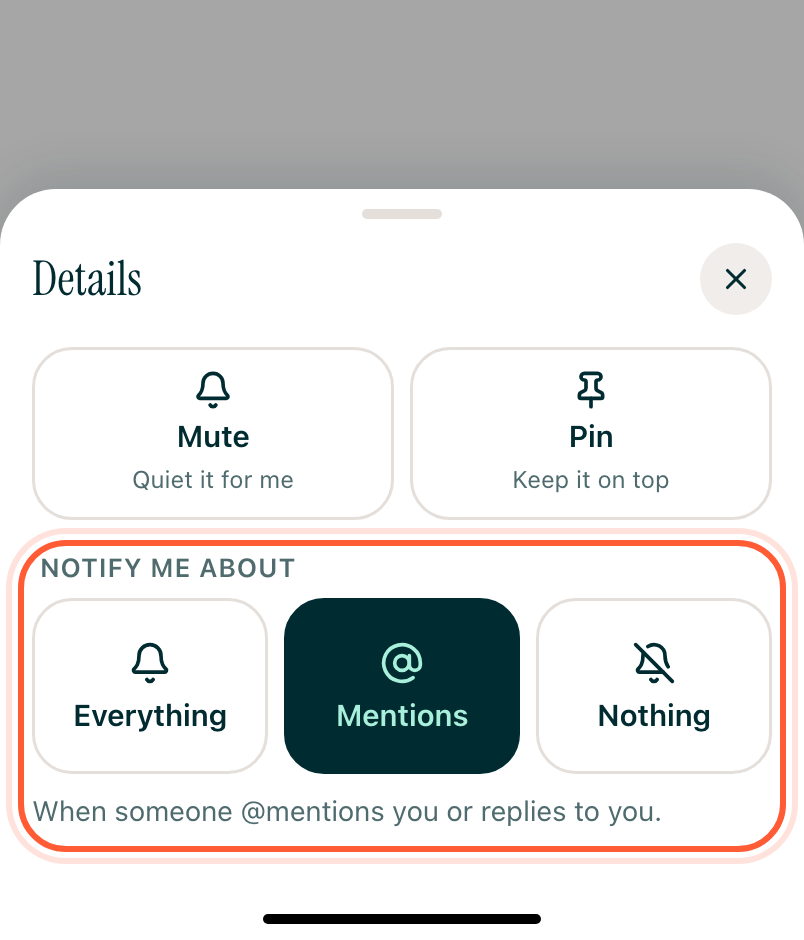
Step 2Pick what you hear about
Under Notify me about:
- Everything: every new message.
- Mentions: only when someone @mentions you or replies to you.
- Nothing: no notifications from here.
One tap saves it. Once you've changed it, the line below also says what the usual is, like "The default here is everything."
Step 3Mute or pin it
- Mute ("Quiet it for me") turns notifications off for this conversation. It's the same as Nothing. Tap Unmute to go back to the usual.
- Pin ("Keep it on top") keeps it at the top of Messages. Tap Unpin to put it back in order. See Pin a conversation.
You can also swipe a conversation left in Messages, or touch and hold it, for Mute and Pin.
What does each conversation do by default?
| Conversation | You hear about |
|---|---|
| A client assigned to you | Everything |
| A client nobody is assigned to yet | Everything, for the whole team |
| A teammate's client | Mentions |
| A deal thread | Everything |
| A direct message you're in | Everything |
While you're on time away, most conversations drop to Mentions (or Nothing if you're fully off) and whoever covers for you hears about them instead.
Example uses
- A closed deal's thread keeps buzzing with thank-yous. Mute it.
- Your teammate is working a big listing and you want to follow along. Set their client's conversation to Everything.
- You're under contract with Priya and Sam. Pin their conversation until closing.
Does muting stop the texts?
No. Texts still come in and show in Messages. Muting only stops the notifications on your phone. To turn off all AveryIQ notifications, see Notifications and sounds.