Delete someone from AveryIQ
Delete a contact from People with a swipe, or from Edit on their page. AveryIQ shows what goes with them first, because a delete can't be undone.
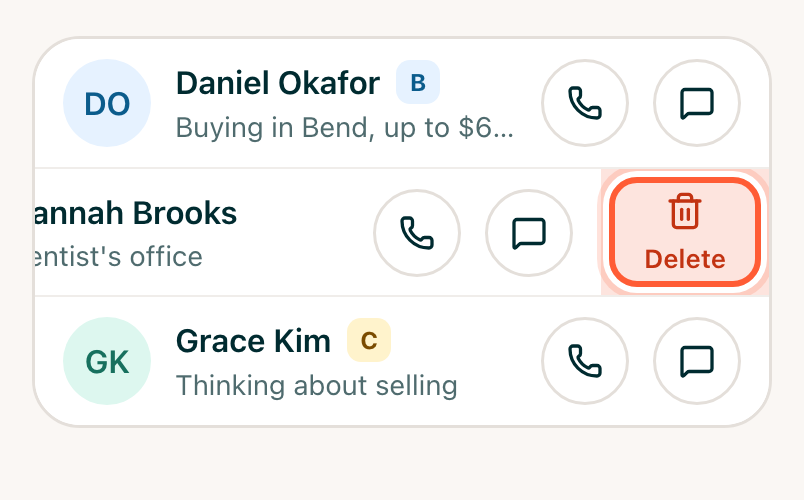
To delete someone, open People, swipe their row to the left and tap Delete. Or open their page, tap Edit, then Delete at the bottom. Before anything is removed, AveryIQ tells you exactly what goes with them, like their notes, texts and open tasks. A delete can't be undone, so if you only want Avery to stop bringing them up, turn off Nurture instead.
Step 1Swipe from People
- Open People and find them. See Find someone.
- Swipe their row to the left.
- Tap Delete.
Step 2Or delete from their page
- Open their page and tap Edit at the top right.
- Scroll to the bottom of Edit and tap Delete.
On a task in your deck, you can also touch and hold their name, then tap Delete with their first name, like Delete Hannah.
Step 3Check what goes with them, then confirm
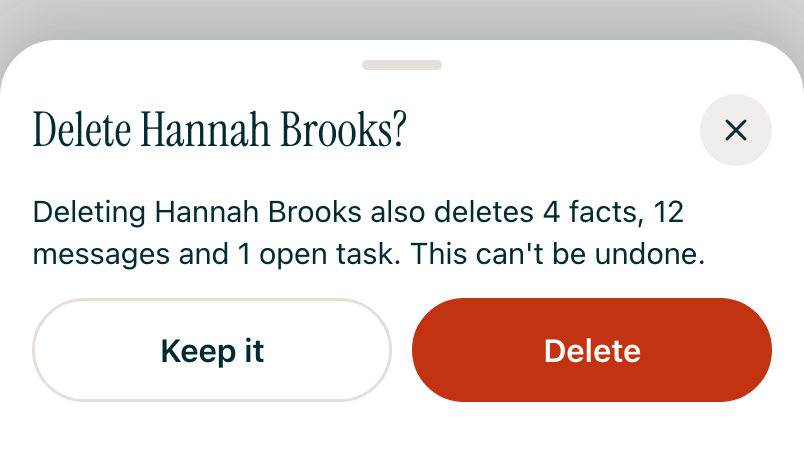
AveryIQ shows what deleting removes, like "Deleting Hannah Brooks also deletes 4 facts, 12 messages and 1 open task. This can't be undone."
- Tap Delete to delete them.
- Tap Keep it to change your mind. Nothing is removed.
What goes with them: their details, notes, goals and open-house visits, their conversations with only them in it, deals only they're on, and their open tasks. Group texts and deals with other people stay, without them.
Delete, or something else?
| You want to | Do this |
|---|---|
| Stop Avery suggesting them | Turn off Nurture |
| Leave them out of email blasts | Switch off Group emails on their page |
| Fix a copy of someone | Merge duplicates |
| Remove a spam or wrong number | Delete them |
Example uses
- A spam caller ended up in People. Swipe and delete.
- You imported your phone's contacts and got your dentist's office line. Delete it.
- A buyer moved across the country and asked you to stop texting. Turn off Nurture instead, so you keep the history in case they come back.
Can I get someone back after I delete them?
No. A delete is permanent, which is why AveryIQ shows what goes with them first. If they text or call again, they come back as a new person, without the old history.
Can I delete many people at once?
Not with one tap. Delete them one at a time, or ask in Ask Avery, and she asks you to confirm each one. To quiet a lot of people at once, turn off Nurture for all of them instead; see Clean up your database.