Make a group of people
Keep a named list of people in AveryIQ, like "Past clients 2024" or "Golf outing", to email, invite to an event or focus your deck on. Save one from a search, and let it keep itself up to date.
A group is a named list of people you pick, like "Spring sellers" or "Holiday party list". Use it to email everyone in it, invite them to an event, or have Avery focus your deck on them for a while. Make one from any search in People with Save as group, or start an empty one under People, then Groups. Taking someone out of a group never deletes them from AveryIQ.
Step 1Save a search as a group
- In People, ask a question, like "past clients who bought before 2020". See Find someone.
- Tap Save as group.
- Type a Group name.
- To have it change on its own, turn on Keep it up to date. People who start to fit join, and people who stop fitting leave, every hour (or each night when the search reads your notes).
- Tap Create.
Anyone you add or remove yourself stays that way, even in a group that keeps itself up to date.
Step 2Or start an empty group
Open People, tap Groups at the top, then New group. Name it and tap Create, then Add people to search and check off who belongs. Tap Select all 12 shown to take everyone a search shows, and Add when you're done.
Step 3Use the group
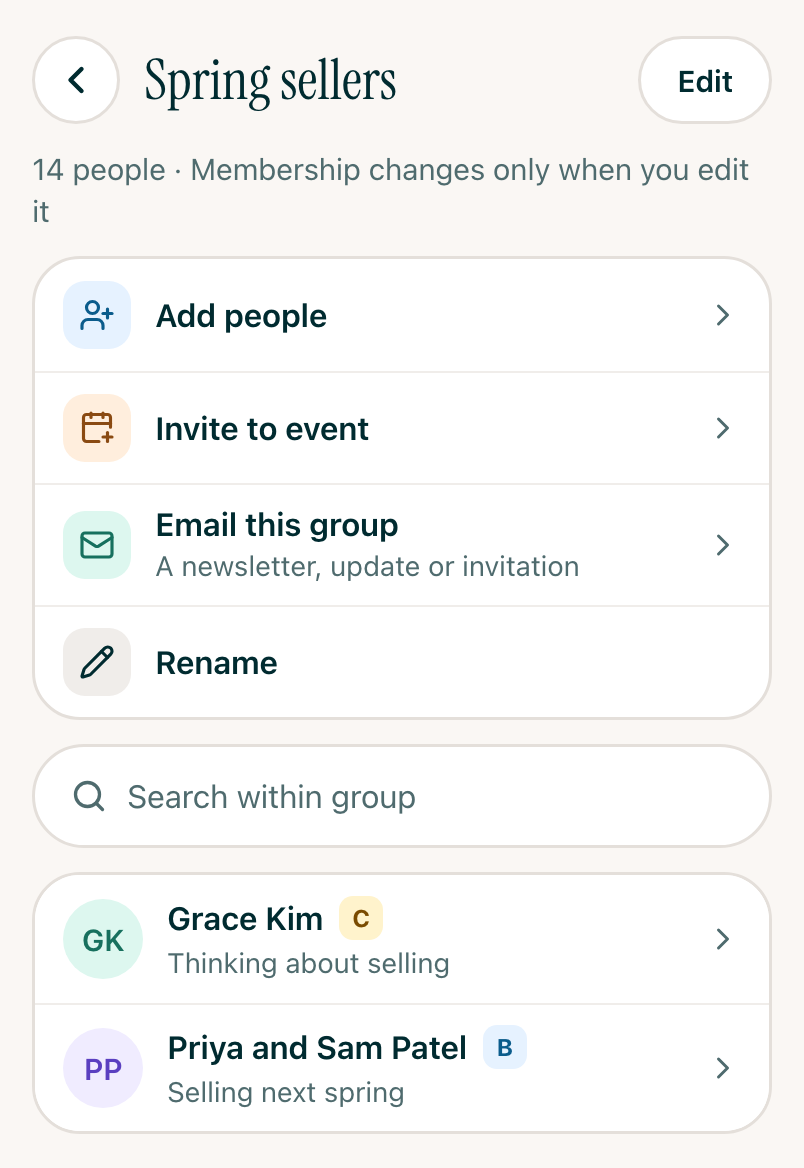
Open it from People, then Groups:
- Email this group: a newsletter, update or invitation. See Send your first email.
- Invite to event: pick an upcoming event, or Create new event. See Host a client event.
- Search within group: type a name, or a question and tap Ask within group.
- Focus your deck: in Deck settings, set Nurture rotation to Groups and pick it. Avery brings up only people in it until the date you choose.
Change or delete a group
- Take people out: tap Edit, check who to remove, then Remove 2 from group. You get Undo for a few seconds.
- Rename: tap Rename, type, tap Save.
- Stop it updating: tap Keeps itself up to date, then Stop updating. The people in it now stay.
- Delete it: scroll to the bottom and tap Delete group, then confirm. The group goes away; the people in it stay in AveryIQ.
When you'd use it
- Every December, save "past clients" as a group and email them a holiday note.
- You're hosting a pie giveaway. Save "people in Maple Ridge" as a group, then Invite to event.
- For the spring market, focus your deck on a "Likely to sell" group for 30 days.
Is a group the same as a group text?
No. A group here is a list for emails, events and your deck, and they never see each other. A group text is one conversation where everyone sees each other's replies; start one from Messages. See Send a text.
Why are there no tags?
Groups and search do what tags used to. See Follow-up without tags.
A group here is a saved list of people. To text several people in one conversation, see Send a group text.