Use Messages
Messages in AveryIQ holds every conversation with your clients, leads and sphere, your team's direct messages and your private thread with Avery. Search it, filter unread, pin, mute and start a new text or call.
Messages is where your conversations live, like Messenger: texts and calls with your clients, leads and sphere, your team's direct messages, and your own thread with Avery at the top. Tap Messages in the dock. New messages show a dot and a count on the tab, and tapping a row opens the conversation.
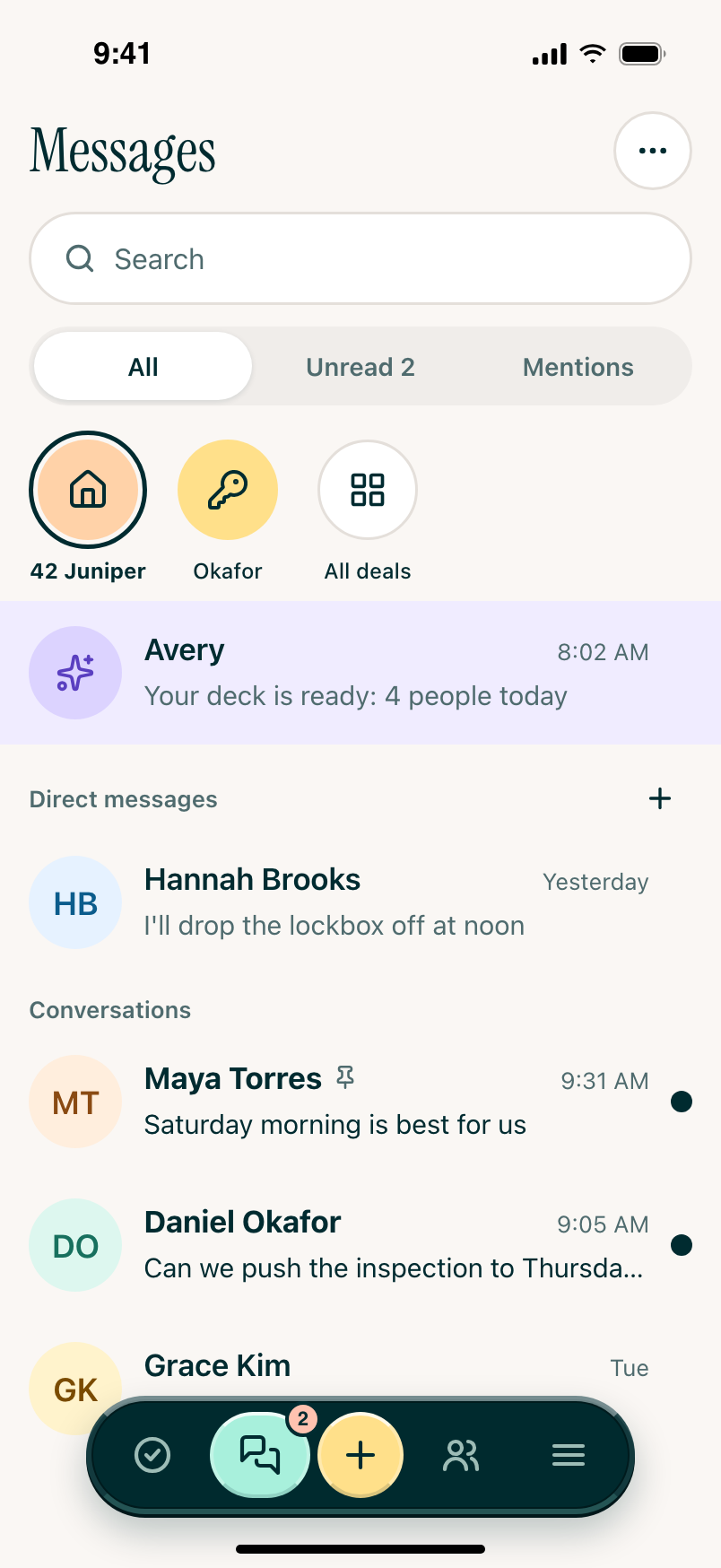
What's in it, top to bottom
- Search: find people, messages and deals.
- All, Unread and Mentions: Mentions shows conversations where a teammate @mentioned you.
- Deals: a bubble for each deal that was active in the last 10 days. A ring means something new. Tap one to open the deal.
- Avery: your private thread with her, always first. Only you see it. See Ask Avery.
- Texts forwarded from your personal phone: shows only when texts are waiting for you to review.
- Direct messages: messages between you and your teammates. Tap + beside it, or Message a teammate.
- Conversations: everyone else, newest first, with pinned ones on top.
Start a text, a call or a group
Tap ⋯ at the top right:
- New message: pick a person or a teammate.
- Call a number: a keypad, for a number that isn't in AveryIQ yet.
- New group: a group text with several people. See Send a group text.
- Mark all read: clears every dot, with Undo.
The + in the dock has New message and Call too.
Keep it tidy
Swipe a conversation to the right to Mark read or Mark unread. Swipe it to the left to Pin or Mute. Or touch and hold it for the same choices. See Pin a conversation.
Example uses
- Between showings, tap Unread to see only who's waiting on you.
- Your assistant wrote "@Jordan can you call her back?" in Grace's conversation. Mentions takes you straight there.
- You're working a deal with Priya and Sam. Pin their conversation so it stays at the top until closing.
Why isn't a client's reply here?
If you texted them from your phone, their reply went to your phone's Messages app, not AveryIQ. On an iPhone, send your texts to AveryIQ so Avery sees them, or use a team number, where every reply comes into AveryIQ.
Can I use Messages on my computer?
Yes. On the desktop web app, your conversations are in Messages sidebar on the left. Press ⌘K (Ctrl+K on Windows) to search.