Save a LinkedIn or Facebook profile to AveryIQ
With the AveryIQ Chrome extension, click once on someone's LinkedIn or Facebook profile and Avery saves what it says, like their job, town and family, to their page in your real estate CRM.
The AveryIQ extension for Chrome saves someone's LinkedIn or Facebook profile to AveryIQ. Open their profile on your computer, click AveryIQ in Chrome's toolbar, pick who it is, and click Save. Avery reads the page and keeps what it says about them (where they work, where they live, family, milestones, contact details) on their page.
When you'd use it
- You met Daniel at an open house and want to know more before you call. Save his LinkedIn, and his job and employer show on his page.
- A past client's Facebook says they just had a baby. Save it, and Avery has the news the next time she suggests a check-in.
- A friend of a friend comments on your post about a new listing. Save their profile as someone new, and Avery adds them to your database.
Step 1Add the extension
On your computer, in Chrome, add the AveryIQ extension from the Chrome Web Store. It's the same extension that imports from KW Command and prints your cards, so you may have it already.
Click the puzzle piece in Chrome's toolbar and pin AveryIQ, so it's always one click away.
Step 2Connect it once
Open anyone's LinkedIn or Facebook profile and click AveryIQ. The first time, it says Connect AveryIQ. Click Connect, and sign in to AveryIQ in the tab that opens. You see The extension is connected.
Step 3Save a profile
On their profile, click AveryIQ. It shows their name and who they could be in AveryIQ:
- Linked: someone already saved from this profile.
- Same name: someone in AveryIQ with the same first and last name. Pick them only if it's really them.
- Maya Torres, someone new (New): add them as a new person.
Pick one and click Save.
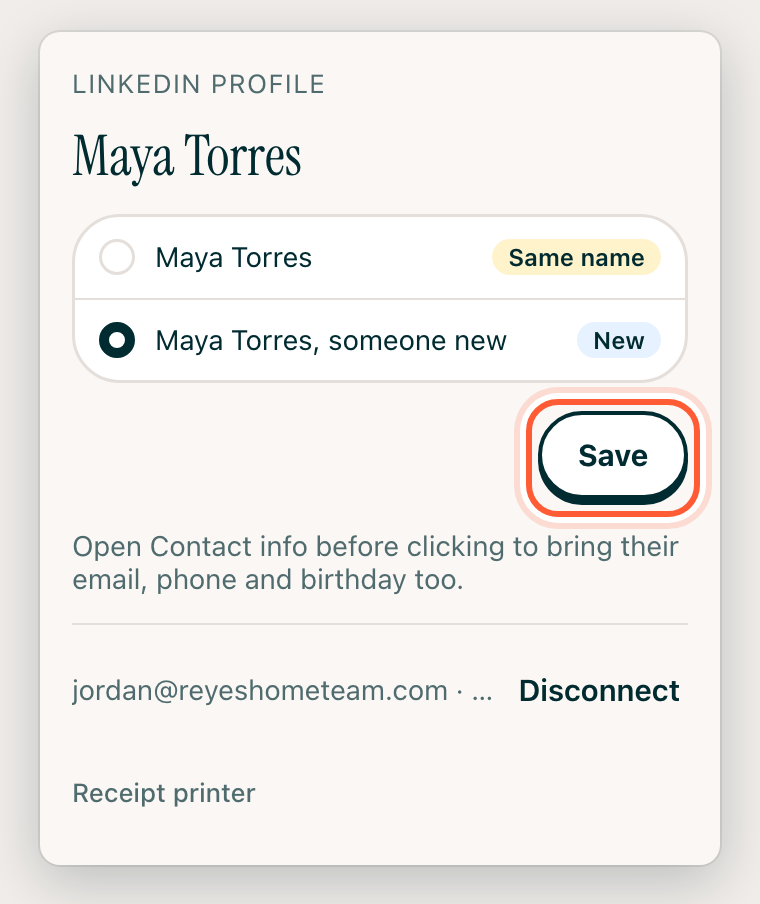
On LinkedIn, click Contact info on their profile before you click AveryIQ, to bring their email, phone and birthday too.
You see Saved to Maya Torres. A minute later the profile is on their page as a note, in Avery's short version. Their profile link is saved on them, so next time it shows Linked. For someone new, your phone also gets a notification like "Maya Torres added from LinkedIn".
Saved it to the wrong person?
Open that person's page in AveryIQ and tap the profile note to open it. Tap Delete, then Delete note and undo its changes (it shows how many), which also takes back what Avery filled in from it. Then save the profile again and pick the right person (Add a note about someone). If you added someone new by mistake, delete them or merge them into the right person.
Something went wrong
- Save people to AveryIQ: you're not on a profile. Open the person's own LinkedIn or Facebook profile page, not a post or a search.
- This page hasn't shown anything yet: wait for the profile to load, then click Try again.
- Couldn't find whose profile this is: reload the page and try again.
- That's a lot of saves in a minute: wait a moment, then try again.
Does LinkedIn or Facebook know I saved them?
No. The extension reads the profile only when you click it, and only what's on your screen. It doesn't scroll, click or message anyone, and neither site can see that it's installed.
Does it work on my phone?
No. It's for Chrome on a computer. On your phone, screenshot the profile and share it to Avery, or tell Avery about someone.
To sign the extension out, click AveryIQ and click Disconnect at the bottom.