Everything in AveryIQ Settings
Every row in AveryIQ Settings, from Deck settings, Time away and Notifications to Avery's email, Gmail, your team number, your email footer and domain, Plan and Account, with what each one changes.
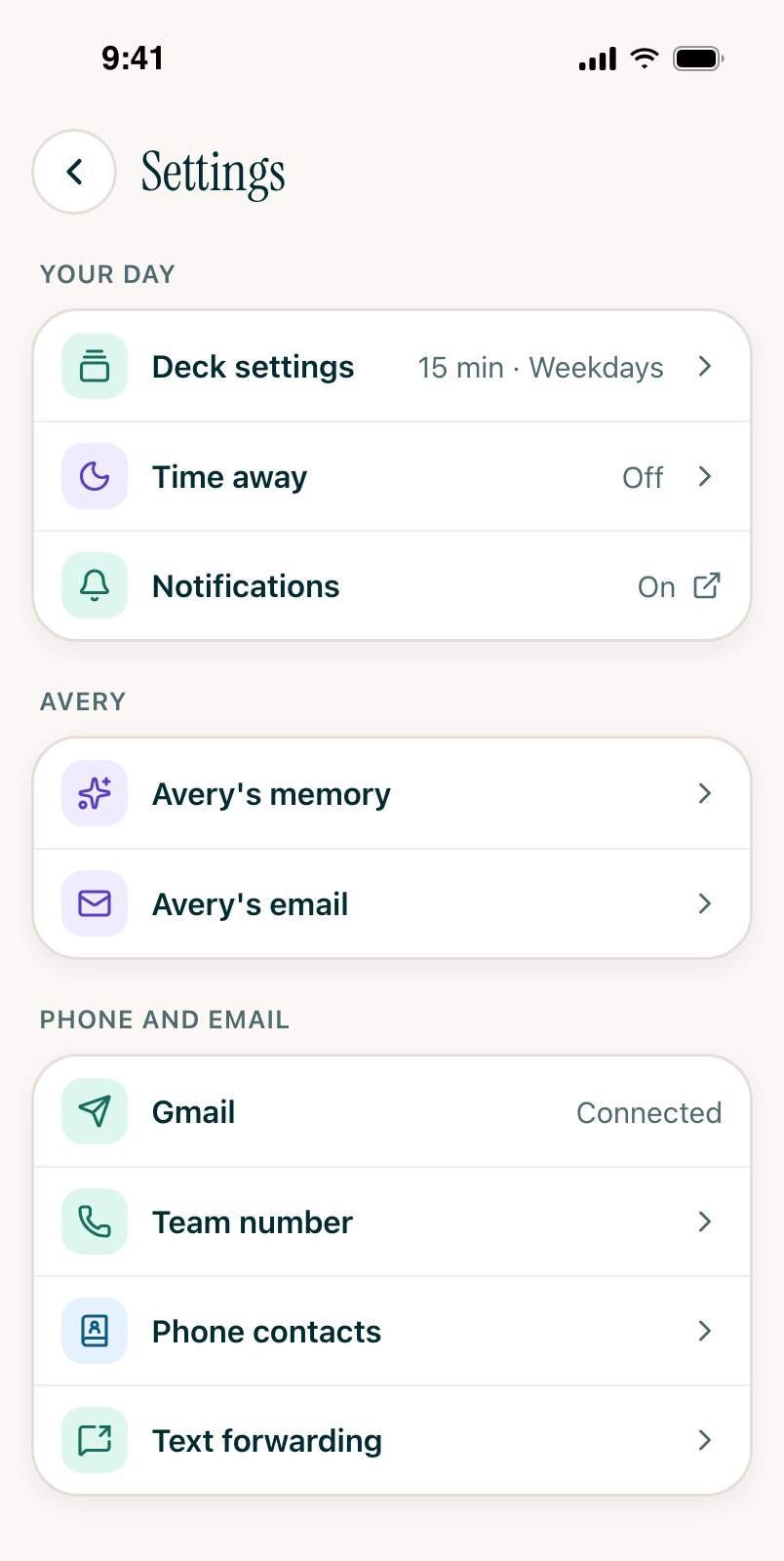
Settings is where you change how AveryIQ works for you: when your deck is ready, time off, notifications, what Avery remembers, your phone and email setup, and your account. To open it, tap your initials at the top of Tasks, or tap More, then Settings. Each row shows its current value on the right, so you can check things without opening them.
Your day
- Deck settings: what time your deck is ready, which days, how many minutes a day, birthdays and home anniversaries, and how new leads are prioritized. The row shows something like 15 min · Weekdays. See Deck settings.
- Time away: going on vacation? Set the days you're gone, and pick a teammate to cover. The row says Off, or Until the day you're back. See Take time away.
- Notifications (iPhone): On or Off. Tapping it opens your iPhone's settings for AveryIQ. See Notifications and sounds.
- Message sounds (on a computer only): a switch for the sound when a text comes in while AveryIQ is open in your browser.
Avery
- Avery's memory: what Avery knows about you and how you work, in pages you can read and correct. See Avery's memory.
- Avery's email: Avery's own email address, for copying her on email that belongs in your CRM. See Set up Avery's email.
Phone and email
- Gmail: shows Connect, Connected or Reconnect. Connected, the emails you send from your deck go from your Gmail. See Connect Gmail.
- Team number: a shared number your whole team texts and calls from. See Your own number or a team number.
- Phone contacts: bring people in from your iPhone's contacts. See Import your phone contacts.
- Text forwarding (iPhone): send the texts you get on your own phone to AveryIQ, so Avery sees them. See Send the texts you get to AveryIQ.
Email blasts
- Sending is paused for your team: only shows if sending was stopped. Tap Get help for what to do. See Unsubscribes, bounces and spam reports.
- Footer: your brokerage, mailing address and license number, at the end of every email blast. The row says what's missing, like Add license number. See Set up your email footer.
- Your domain: send email blasts from your own web address. See Send emails from your own domain.
- Replies: where copies of replies to your email blasts go. See When someone replies to your email.
- This month (or Your trial): how many emails you have left, like 1,840 of 2,000 left. Tap it for How many emails you can send.
Account
- Plan (on a computer only): your free trial or subscription, your card and receipts. See Your plan and billing.
- Account: the email you sign in with, your mobile number, and Sign out. Delete account is at the bottom. See Change your mobile number or sign out.
- Contact support: opens our contact page in your browser.
Privacy and Terms at the very bottom open our privacy policy and terms of service.
Examples
- You're off to Cabo for a week. Open Settings, then Time away.
- Your deck lands at 7 AM, but you don't start until 9. Open Deck settings and change Ready at.
- You got a new cell number. Open Account, then Mobile number.
- Your first email blast is waiting on your license number. Open Footer and add it.
Where did Team go?
Team is on the More tab, right under your Contact Card. See Your team.
Why don't I see Plan on my iPhone?
The iPhone app is for signing in and working. Your plan, card and receipts are in AveryIQ on a computer, under Settings, then Plan.